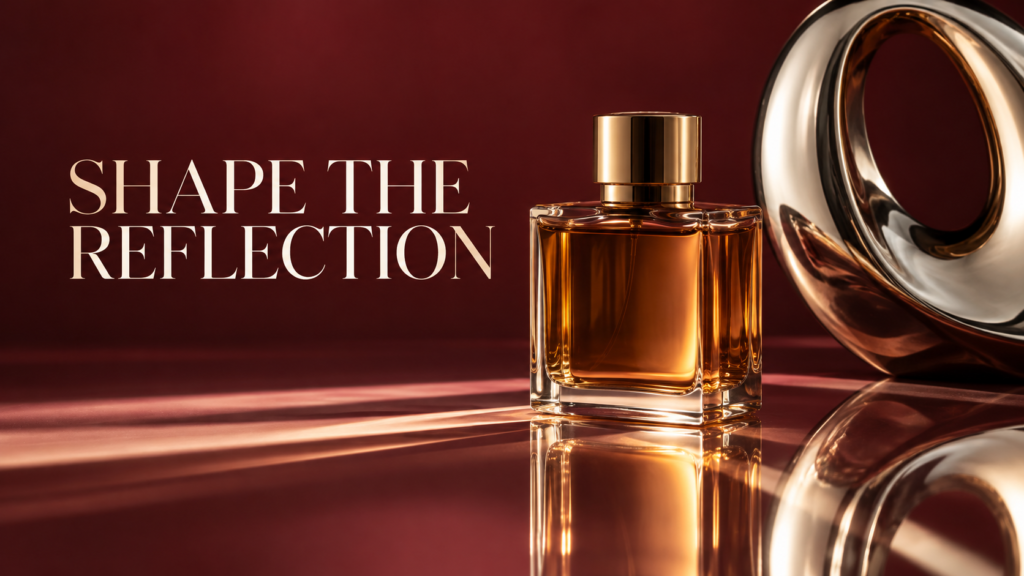
Reflective product photography becomes easier when you stop treating every highlight as a defect. Glass, polished metal and glossy packaging tell viewers what they are through the reflections they show. The aim is to create useful reflections while removing the ones that hide shape, color or important product information.
You can begin with a bottle, a window, two pieces of card and a stable camera. More equipment may increase control, but it will not replace the habit of looking closely at what the surface reflects. A small movement of a card can change the picture more than a large adjustment to exposure.
This guide gives you a repeatable tabletop workflow, a way to diagnose distracting highlights and an exercise for building your own reference photographs. The exercises are suggested practice activities, not claimed results from a product test.
On this page
Make a reflection map before changing settings
Place one clean product on a table and look at it from the camera’s position. Identify the bright and dark shapes visible on its surface. A bright rectangle may be the window. A dark shape might be your camera, your clothing or an unlit part of the room.
Move your head slightly while watching the object. Notice which reflections move, which become wider and which cross the label. This quick observation tells you whether the problem is mainly the product angle, the camera position or the surroundings.
Photographer Dave Montizambert explains in his glass-bottle lighting lesson that photographing a shiny object involves controlling reflections of the sources around it. His demonstration also shows why changing a rectangular source’s orientation can change the reflection across a cylindrical product. Use that principle as a starting point, then judge your own object.
Write a one-sentence goal: “Show the amber liquid, keep the front label readable, and create one narrow highlight along each side.” A specific goal prevents you from adding lights simply because the setup looks professional.

Start with a small, controllable set
For your first session, use one glass bottle or clean metal object rather than a collection of unrelated products. Add a simple background, a stable support and a camera or phone that allows exposure and focus to remain consistent.
Useful inexpensive materials include white card, black card, a translucent diffusion panel designed for photography and clamps. Keep materials safely away from hot lights. A window can serve as your first source; an adjustable continuous light makes it easier to repeat the setup when daylight changes.
Clean the product before lighting it. Dust, fingerprints, scratches and uneven labels are especially obvious when highlights outline them. Handle the object by less visible areas and inspect it again after moving it. Cleaning is usually easier than trying to repair dozens of small marks later.
Choose a camera position that represents the object honestly. Moving too close with a very wide lens can exaggerate the nearer edge and make packaging look misshapen. A moderate working distance often makes shape easier to control. Keep enough depth of field for the information a customer needs to see.
Pixanded’s window-light product guide covers the basic tabletop foundation. This article builds on it by treating the reflected environment as part of the lighting design.
Build the image one reflection at a time
1. Establish the camera and product position
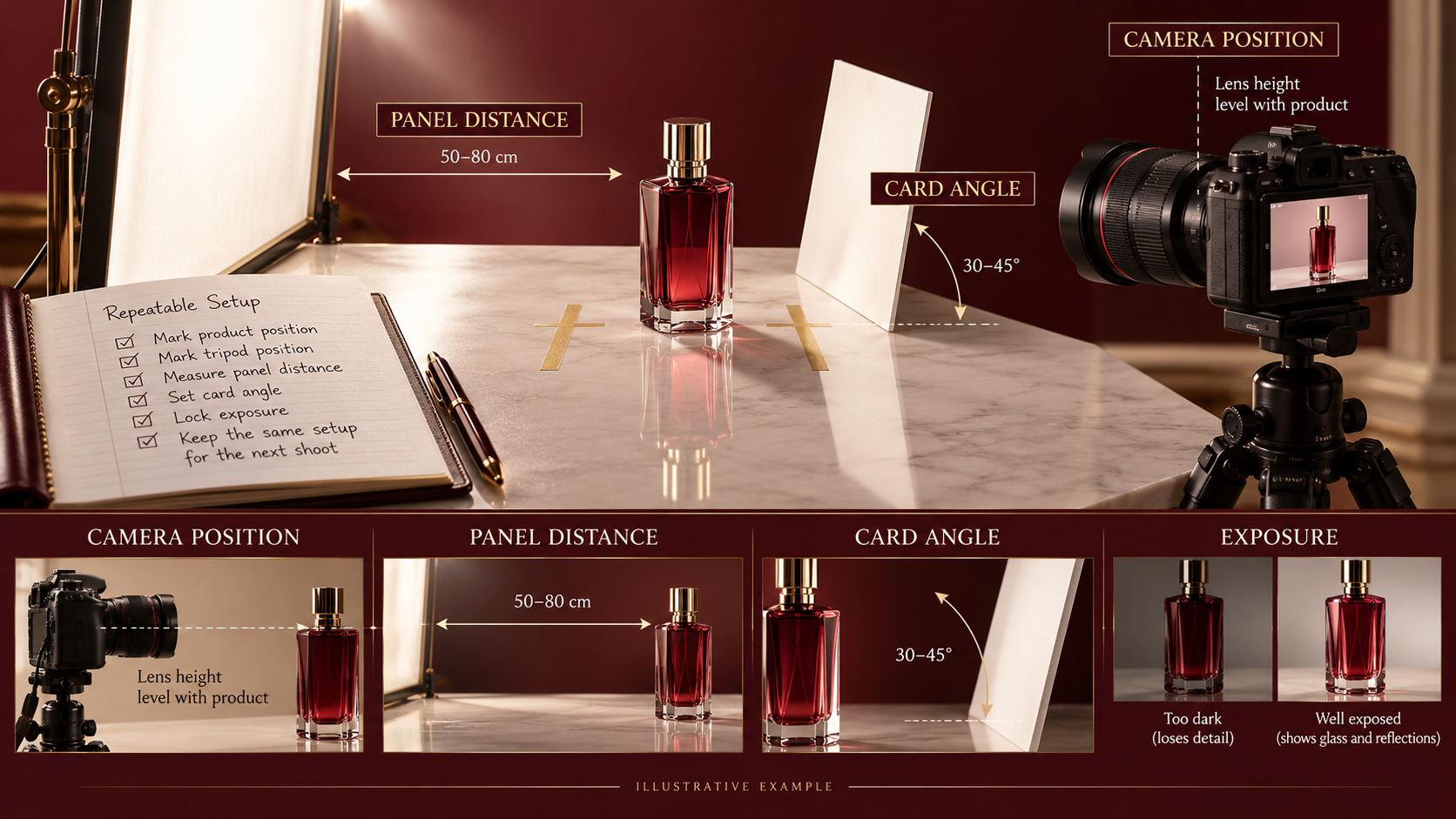
Frame the item, level the camera where appropriate, and decide whether you need a straight catalog view or a more expressive angle. Mark the object’s position with a small piece of tape outside the photographed area. Mark the support position too if you expect to recreate the setup.
Keep the main label or defining feature visible. Do not rotate the bottle into a beautiful highlight if that makes the important text unreadable. The product’s purpose should determine which tradeoffs are acceptable.
2. Give the surface something deliberate to reflect
Place a large light-colored surface to one side and watch its reflection through the camera. A white card can create a bright reflected area even when it is not itself a lamp. A diffusion panel can change the appearance of a light source behind it.
Move the panel closer, farther away, and around the product in small increments. Watch the shape of the reflection rather than just overall brightness. A broad band can describe a curve beautifully; the same band across a label can obscure information.
3. Introduce black card for definition
A black card can create a dark reflection that outlines a shiny edge. It is particularly useful when a pale object disappears into a pale background or a metal surface reflects a featureless bright room.
Start with a narrow card. Move it slowly until it produces the edge you want. If the dark area becomes too broad, move the card or reduce its apparent size rather than immediately raising exposure. Changing exposure brightens the whole image; changing the card alters a particular reflected shape.
4. Check the opposite side before adding another light
One controlled source and two cards may be enough. A second light can help separate an edge or illuminate a background, but it also creates another reflection to manage. Add it only when you can name the problem it will solve.
5. Record the setup
Take an ordinary behind-the-scenes photograph and note the position of the camera, product, source and cards. Record exposure and white balance. The setup photograph does not need to be artistic; it needs to help you repeat what worked.
Glass and polished metal need different priorities
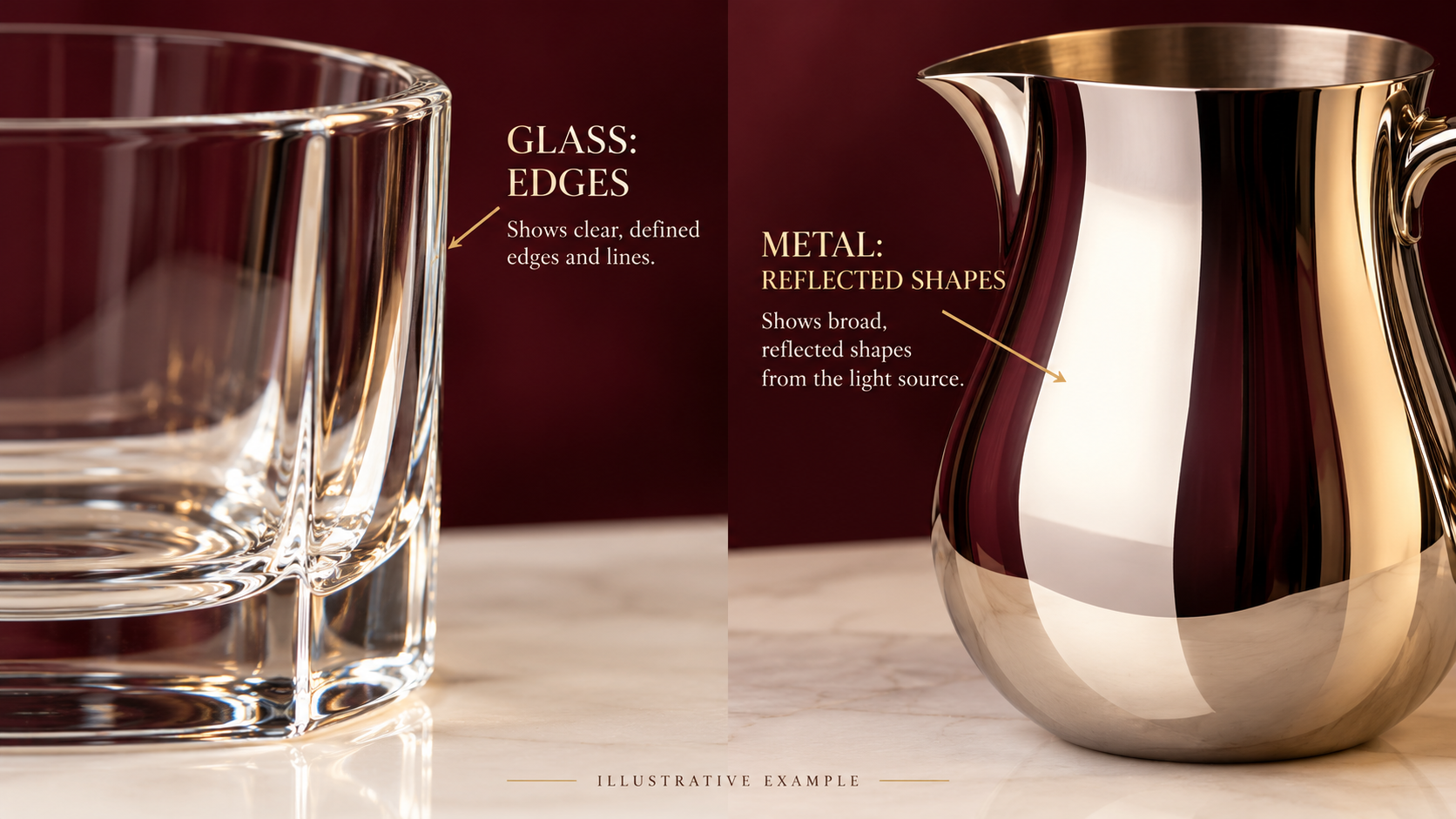
Clear glass can disappear when its edges do not separate from the background. In one approach, a bright background and dark reflected edges define the outline. In another, a dark background and bright edge highlights reveal the form. These are different visual goals, not universal recipes for every glass object.
Liquids, tinted glass and thick bases can complicate the picture. Begin with the overall outline, then inspect the neck, base and contents. If one part needs a separate lighting treatment, make that decision consciously rather than trying to force every part into one exposure.
Polished metal is often dominated by its reflected environment. A cluttered room can become a patchwork across a spoon, watch case or chrome lid. Larger clean surrounding surfaces can create more controlled bands, while small black cards help define edges.
Brushed metal has directional texture. Rotate the object carefully and judge whether the lighting shows the finish without making it appear scratched or glossy in a misleading way. The best promotional photograph still needs to represent the actual material.
| Surface | Useful visual priority | First adjustment to try |
| Clear glass | Visible outline and believable transparency | Change the background and edge reflections |
| Amber or colored glass | Shape plus the color of the contents | Adjust side and background illumination separately |
| Polished metal | Clean gradients and recognizable form | Simplify the environment it reflects |
| Brushed metal | Direction and texture of the finish | Rotate the object slightly relative to the source |
| Glossy printed packaging | Readable information with material character | Move the highlight away from key text |
Why a polarizer is an optional tool
A polarizing filter can reduce some reflections from non-metallic surfaces under suitable conditions. Nikon’s polarizer lesson demonstrates reflection control on glass and water. Its effect depends on the angle and surface, and it will not simply erase every highlight from every object. Do not assume it can remove direct reflections from bare polished metal.
If you have a polarizer, rotate it while observing the entire product. Check whether it improves the label while also making glass or liquid look less convincing. Compare exposure and color carefully because fitting the filter changes the light reaching the camera.
For a beginner setup, first learn to move the light, cards and object. Those controls remain useful whether or not a filter is fitted. A tool should solve a visible problem, not become an automatic step that removes the product’s character.
A 12-frame exercise that teaches more than random adjustments
Use one bottle and keep the camera, background, exposure and white balance fixed as far as possible. Arrange a single side source or window and make four small lighting variations: no card, white card, narrow black card, and a changed source or panel position.
For each variation, photograph the product at three slight rotations. Keep the rotations modest enough that the label remains useful. That produces twelve practice frames. Label the files by lighting variation and product angle so you can identify what changed.
Judge the results against three criteria: Is the label readable? Does the outline communicate shape? Does the surface still look like its real material? Pick a favorite for each criterion before choosing an overall winner. One photograph may have the best label while another has the best edge definition.
This matters because “less reflection” is an incomplete score. A nearly reflection-free bottle can look flat; a beautifully luminous bottle can still fail as a catalog photograph if customers cannot see the packaging.
After choosing a setup, recreate it from your notes on another day. If the result changes, examine daylight, card position and camera height before blaming the editing software. Repetition reveals which parts of your process are controlled and which are accidental.
Diagnose problems before retouching
| Problem | Likely area to investigate | First practical response |
| White band crosses the label | Source reflection and product angle | Move the panel or rotate the product slightly |
| Glass vanishes into the background | Edge separation | Introduce a deliberate light or dark edge reflection |
| Camera appears in the product | Reflected surroundings | Change camera position or simplify the area around it |
| Chrome looks patchy | Cluttered reflected environment | Replace clutter with larger plain surfaces |
| Highlight loses all detail | Exposure and reflection intensity | Check clipping and revise the lighting geometry |
| Similar products look inconsistent | Unrecorded changes between setups | Mark positions and use the same review criteria |
Use Pixanded’s histogram guide to check exposure, but remember that a correctly exposed file can still have an inconvenient reflection. Exposure evidence and product readability answer different questions.
Retouch dust and small distractions without silently redesigning the item. Keep labels, dimensions, texture and color faithful to the product. If you combine exposures, compare the result with the object and check that highlights still follow a plausible shape.
Build one complete bottle photograph before adding complexity
Start with one plain glass bottle, a stable surface and a simple background. Remove unnecessary objects from the set so you can identify which surface creates each reflection. Clean the product and inspect it from the final camera angle. Dust that is nearly invisible on the table may become obvious against a bright reflection.
Place the camera, then stop moving it casually. A polished surface reflects different parts of the room when the viewing angle changes. If you change the camera, light and cards together, you lose track of what produced the improvement. Make one controlled adjustment, record a frame and compare it with the preceding version.
Begin with a broad diffusion panel lit from a sensible direction. Watch the shape the bottle reflects, not merely the brightness of the lamp. Move the panel closer, farther or around the side and observe how the highlight changes. Keep the light source and any support stable while you work.
Aim for a readable product shape. A bright edge can separate glass from the background, while a broad highlight can describe the curve. The goal is not a surface with no reflections. It is a reflection pattern that lets the viewer understand the material and form without being distracted by the room.
Use cards as visible parts of the lighting design
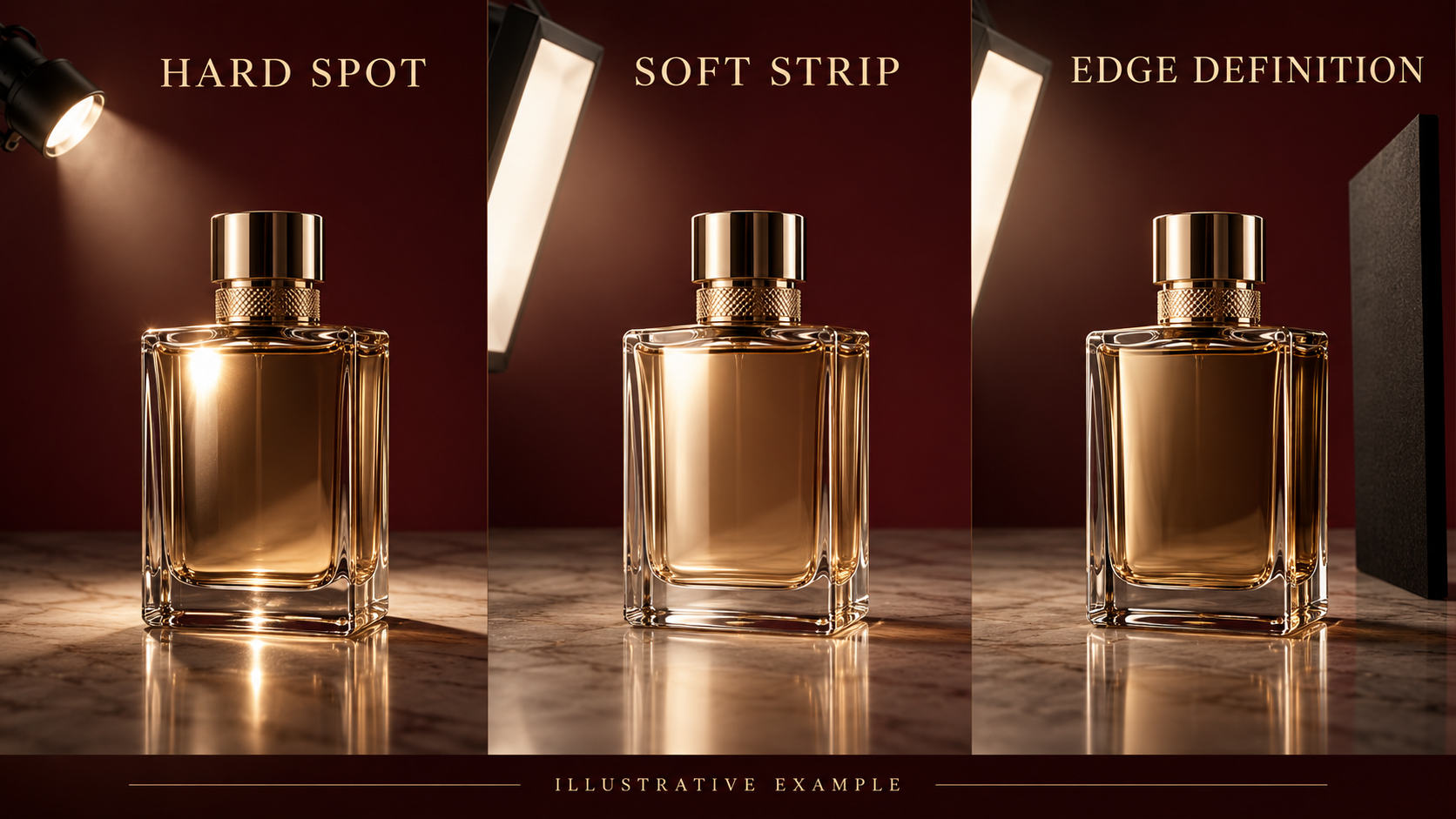
A white card provides a bright shape for the product to reflect. A black card can create a darker edge or separation. Move a card a small distance and look through the camera after each change. The useful position depends on the product’s surface and the viewing angle; a diagram is a planning guide rather than a universal placement recipe.
Support the cards so they do not drift between exposures. Temporary hand-held positions are useful for finding the effect, but a stable holder lets you repeat the frame. Keep supports clear of the camera’s view and inspect whether they appear in the reflected surface. What is outside the direct frame may still be inside the reflection.
For a glass bottle, try a broad bright panel on one side and a narrow dark card near the opposite edge. For polished metal, think about the entire reflected environment. A large uncontrolled ceiling light can appear as a strong shape even when you consider it part of the room rather than your setup.
Photograph the arrangement once it works. Include the camera, product, panels and cards in the reference view. Note the approximate distances and the direction of the key reflection. The reference makes a future reshoot easier and helps you explain which adjustment created the final appearance.
Photograph a metal object without photographing the whole room
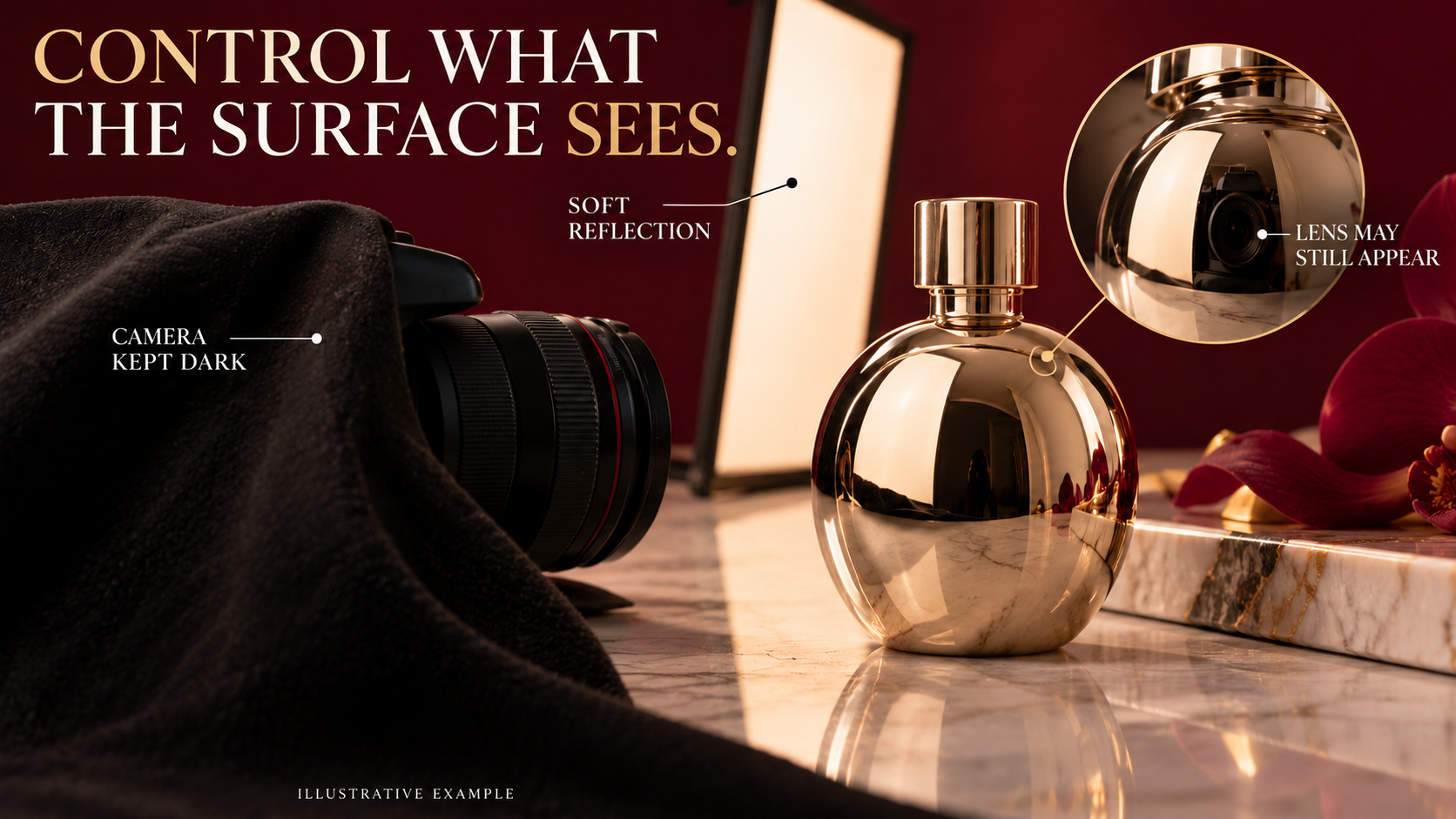
A reflective steel object can act like a curved mirror. Before adding another lamp, look for recognizable room shapes in its surface. The photographer, camera, window and ceiling may all be visible. Decide which shapes are useful and which distract from the product’s design.
Change what the product sees. Position a broad neutral panel where it produces a deliberate bright gradient. Introduce dark material where you need separation. If the camera is reflected, try a carefully placed dark surround with a small opening for the lens, keeping it clear of the lens and equipment ventilation.
Do not promise that a polarizing filter will remove all of these reflections. Its usefulness depends on the surface and geometry, and reflective metal does not behave like every non-metallic surface. Use a polarizer as an evaluated tool rather than a default solution. The existing manufacturer source in this article explains its scope; your setup still requires observation.
Take a test frame and examine the whole object at a useful size. A beautiful central highlight can coexist with an unwanted bright patch near the base. Work around the visible surface methodically. Fix the physical cause when possible before deciding to remove something in editing.
Choose an exposure and focus plan for the product
Use a stable camera position and choose an aperture that makes the important parts of the product readable. Depth of field depends on magnification, distance and the optical setup, so there is no single aperture that solves every tabletop shot. Inspect the label, edges and important surface features rather than assuming that a higher f-number means everything is sharp.
Protect important bright reflections from becoming featureless where detail matters. Some small specular areas can be bright by design, but a broad clipped patch across a label can make the product harder to understand. Review exposure with the camera tools available and confirm it in the recorded file.
Keep white balance and light sources under control. Mixed light can create differently colored reflections even when the product itself is neutral. Switch off an unwanted room source where practical, or incorporate it deliberately. A gray reference can help organize your comparison, but it does not remove every mixed-light effect automatically.
If the product is stationary and you need several focus positions, learn a supported focus-stacking workflow separately before relying on it. Check for blending problems around transparent edges and reflections. For this beginner exercise, one carefully focused view is a useful starting point and keeps the lighting lesson understandable.
Separate a setup comparison from a before-and-after claim
Use the same camera position and product arrangement for a three-frame exercise: a small undiffused source, a broader diffused source, and diffusion plus a black card. Label the files with the actual changes. If the source power or exposure must change, record that fact rather than presenting the frames as a controlled measurement.
Describe what you observe. “The broad panel produces a longer highlight along this side” is more useful than “the second photo is 80 percent more professional.” The first statement identifies a repeatable visual relationship. The second invents a metric and teaches nothing about the setup.
Keep illustrative generated examples separate from your own test photographs. They can explain intended highlight shapes but cannot demonstrate the performance of a real filter, camera or lighting product. When you make your own comparison, retain the setup photographs and settings with the files so the result has context.
Try the same exercise at three product angles after the first arrangement is understood. A small rotation can change the reflected pattern dramatically. Review the sequence as a contact sheet and choose the angle that communicates the product clearly. Do not select an angle solely because it hides a problem if it also hides an important feature.
Retouch with a repeatable stopping point
Begin with basic exposure, color and crop adjustments. Remove obvious dust when appropriate, then check that the retouch still represents the actual shape and surface. Do not erase every highlight or seam: those details may tell the buyer what the material is and how the product is constructed.
Keep an untouched original and a separate editing version. Save the final delivery specification beside the project so a later revision does not require guessing the crop or background requirements. If the image will be used commercially, confirm the client’s expectations for accurate representation and acceptable retouching.
End by recording the successful setup and one change to test next time. Perhaps the opposite edge needs a stronger dark reflection, or the camera should be slightly higher. A specific next experiment makes the work teachable and repeatable without turning every reshoot into a fresh guessing session.
Frequently asked questions
Can I photograph shiny products with window light?
Yes. Begin with a stable setup, control the area around the object with cards, and record how the window is positioned. Daylight changes can make repeated sessions less consistent, so compare carefully.
Do I need a light tent?
A tent can simplify the surrounding reflections, but it can also make some products look too uniform. Try one if it serves the required photograph; it is not a substitute for judging edges, labels and material.
Why does more light make the reflection worse?
More output may brighten an already distracting highlight without moving it away from important information. Change the source position, apparent size or orientation before assuming the problem is insufficient power.
Should every reflection be removed?
No. Controlled reflections communicate curvature and finish. Remove distracting reflected clutter while preserving the highlights that help viewers understand the object.
How much editing is reasonable?
Enough to remove minor distractions and prepare an accurate, consistent presentation. Avoid changes that misrepresent packaging, surface condition or color. Agree on the intended use with the client before extensive compositing.
Make the next photograph repeatable
Choose one shiny item, define what the photograph must show, and build a single useful highlight before adding anything else. Save the strongest frame beside its setup photograph and notes. For commercial work, turn that record into part of your client brief so the next session has a clear visual target.