
To take sharp photos in low light, choose a shutter time that controls the movement you want to stop, focus on the required detail, and give that detail enough light. A tripod can reduce camera movement; it cannot stop a person moving during the exposure. A wide aperture can help exposure, but it may leave too little depth of field.
Start with one practical question: what is moving in this photograph—the camera, the subject, or both? Then change the setting or shooting condition that addresses the actual problem.
This guide uses a repeatable exercise: photograph a stationary cup, a seated adult, and the same adult making a small movement in an evening café or a similar room. You can adapt it to the equipment you already own.
Table of Contents
1. Decide what must be sharp
For a cup on a table, the important detail might be the rim and surface texture. For a portrait, it might be the nearer eye. For an event picture, it might be a face and a hand performing an action. Define that requirement before choosing settings.
Also decide the output. A picture intended for a small social post and a large cropped print can tolerate different amounts of softness. Inspect both a magnified view and the intended delivery size.
You need a camera or phone, an existing lens, one stationary object, and a consenting adult. A tripod or firm permitted support is useful for the static comparison. Use a room where you can repeat the framing and lighting. In a café, arrange permission and keep the exercise away from other customers and working staff.
Avoid treating “night,” “indoors,” or “street” as exposure values. A brightly lit shop entrance and a dim table in the same room may require very different settings.
2. Identify the kind of softness before changing ISO
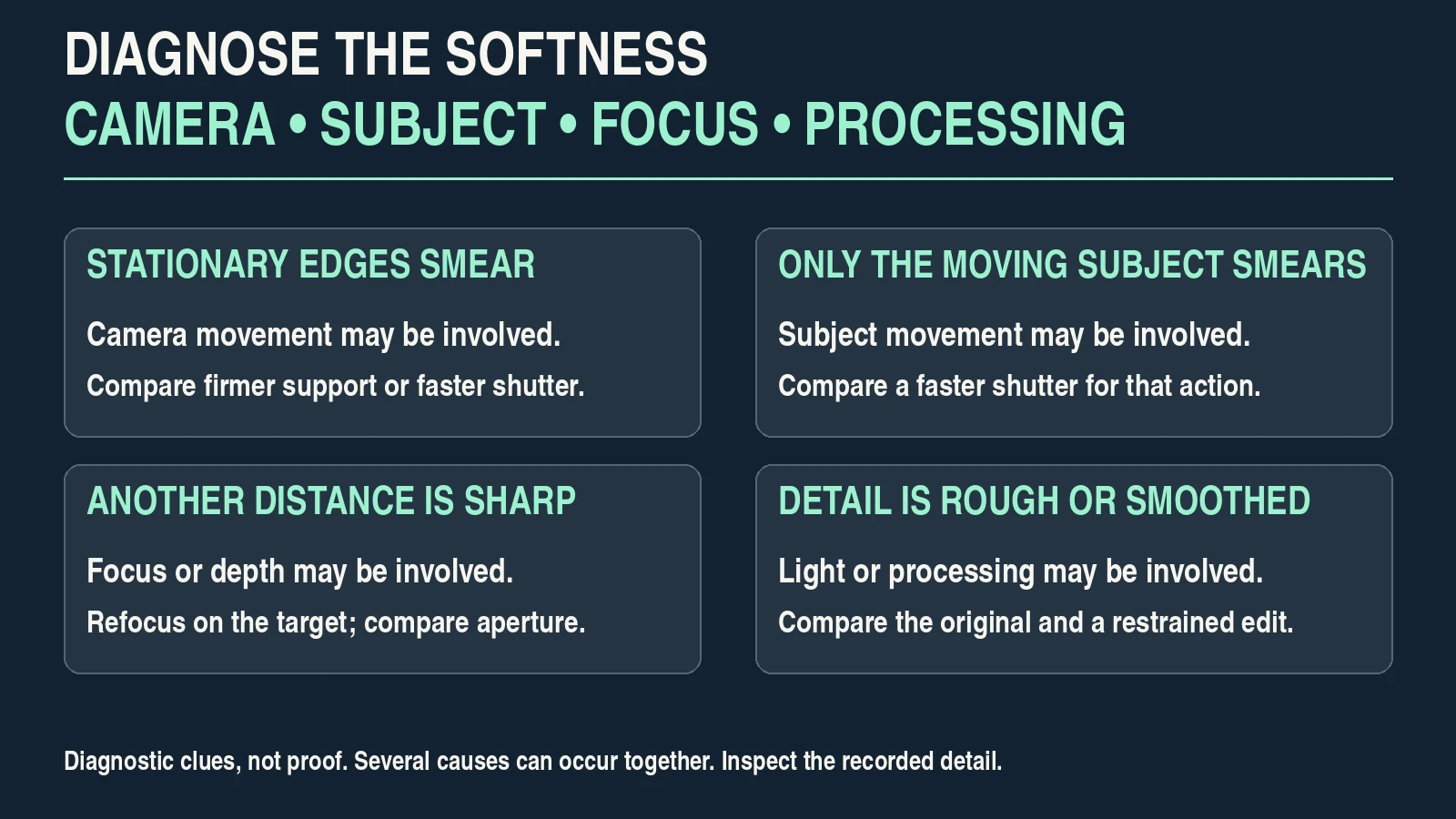
Take a baseline photograph and magnify the required detail. Inspect a stationary background edge as well as the subject. These clues suggest a cause; several causes can occur together.
| What you see | Likely explanation | First useful comparison |
|---|---|---|
| Stationary edges and subject detail show similar directional smearing | Camera movement during exposure | Repeat with firmer support or a faster shutter |
| Background stays clear but the moving face or hand smears | Subject movement | Repeat the action with a faster shutter |
| A different distance is sharp, while the intended eye or object is soft | Focus placement or insufficient depth of field | Select the intended target, refocus, then compare aperture |
| Fine detail is rough or smeared despite correct focus and controlled movement | Low signal, noise reduction, processing or compression | Inspect the original file and a restrained edit at output size |
| Brightness or color changes between otherwise similar frames | Changing light or flicker | Test the actual light and supported flicker/shutter options |
Do not judge focus from a bright rear screen alone. A small preview can conceal blur. Conversely, a noisy magnified file can still make a useful normal-size photograph.
“Raise ISO” is not a complete diagnosis. Raising it can help you retain a necessary shutter time within an exposure workflow, but it does not correct a focus error or create more light at the sensor.
3. Choose shutter time for the actual movement
A shorter exposure gives movement less time to smear across the photograph. Nikon’s shutter-speed explanation describes this relationship. The right value still depends on movement, framing and the result you need.
The familiar reciprocal-focal-length guideline is only a rough handheld starting point. Stabilization, sensor format, camera handling, subject distance, cropping and output size change its usefulness. It is not a subject-motion rule.
For the exercise, keep your lens and framing consistent. The following are illustrative tests, not guaranteed settings:
| Subject in the exercise | Initial shutter comparison | What determines the next change |
|---|---|---|
| Stationary cup, camera firmly supported | 1/30 versus 1/125 second | Recorded cup detail and any remaining support vibration |
| Seated adult holding a pose | 1/125 versus 1/250 second | Eye detail and small changes in expression or posture |
| Adult turning their head or lifting a cup | 1/250 versus 1/500 second | Whether the required face or hand is acceptably clear |
A longer lens, tight close-up or faster gesture may need a shorter exposure. A deliberately still subject and good support may allow a longer one. Try the comparison rather than declaring one value “safe.”
With manual exposure and Auto ISO, you can choose shutter time and aperture while the camera adjusts ISO within its limits, if your model supports that behavior. In aperture priority, check whether a minimum-shutter option actually holds the desired value when light runs out. Watch the recorded shutter and exposure.
For the fundamentals behind the trade-off, see Aperture vs Shutter Speed.
4. Use aperture and light without losing required detail
Choose an aperture that keeps the important parts acceptably focused. The widest setting on your lens is one option, not an automatic answer.
For a hypothetical seated-person test, try f/2.8 if your lens provides it, then compare f/4 with the same composition. If the nearer eye is clear but the farther eye is softer than you want, a smaller aperture may help. Focus position, face angle and distance still matter.
If your lens opens only to f/4 or f/5.6, use it. You can move the subject toward better existing light, reduce movement, change framing, or add permitted light before buying anything.
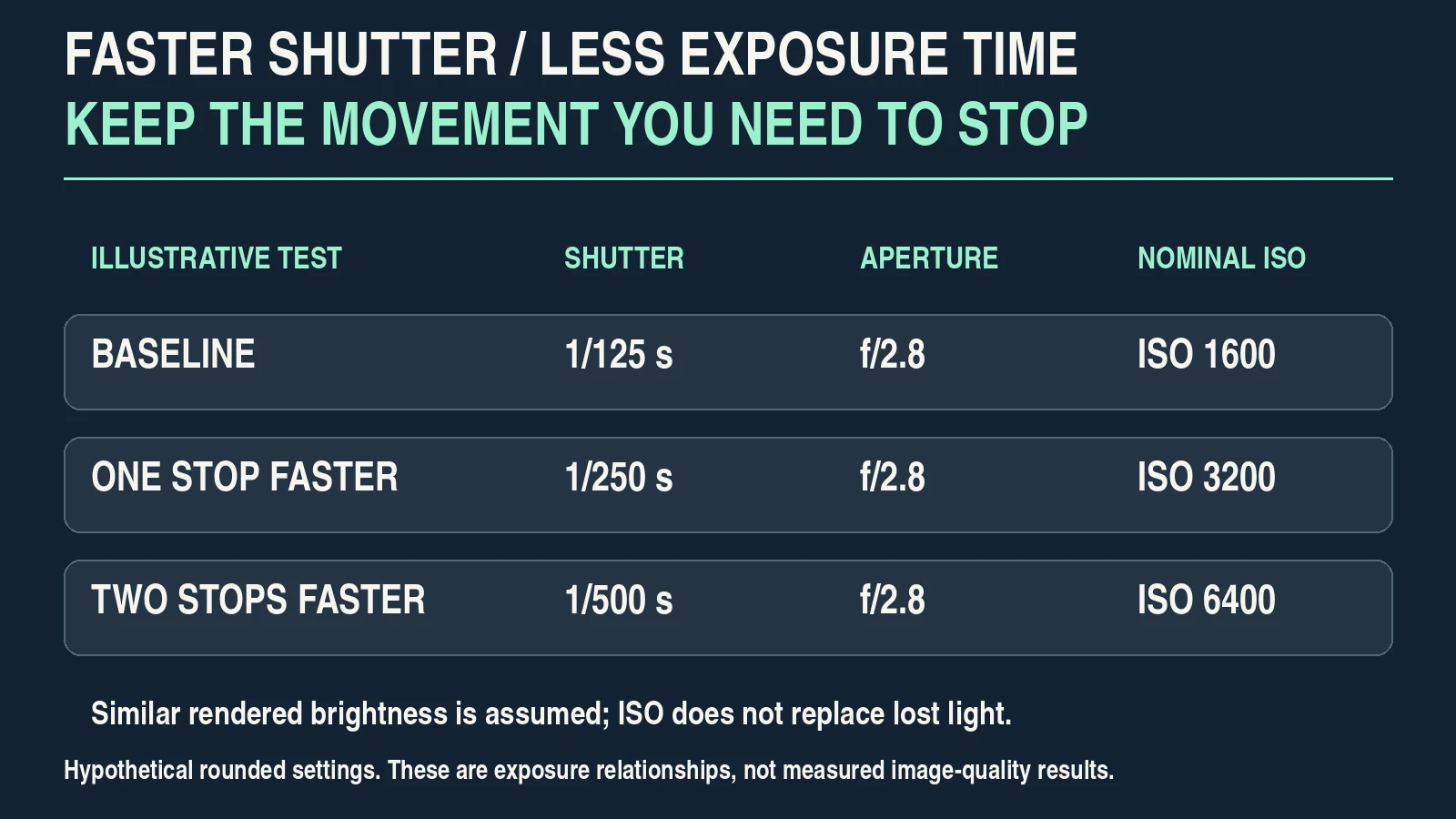
Exposure arithmetic makes the compromises visible. Suppose a hypothetical baseline is 1/125 second, f/2.8, ISO 1600:
- Changing to 1/250 second halves the exposure time. ISO 3200 is a nominal one-stop compensation for similar rendered brightness when the other conditions remain unchanged.
- Changing to 1/500 second requires another nominal stop: ISO 6400.
- Changing f/2.8 to f/4 at 1/250 second also costs approximately one stop, putting that illustrative combination at ISO 6400.
These are rounded exposure relationships, not predictions of a camera’s image quality. Raising ISO does not replace the light lost through a shorter exposure or smaller aperture.
If the result is too dark or too degraded at the required settings, improve the available light or change the assignment. Slowing the shutter merely to obtain a smaller ISO number can sacrifice the very detail you need.
Flash introduces separate questions about synchronization, shutter type, ambient exposure and the light’s contribution to motion. Check your equipment instructions and test the setup; do not assume these ambient-light examples transfer unchanged.
5. Make focus and stabilization do different jobs
Focus places the sharp zone at the intended distance. Stabilization reduces some camera movement. Neither guarantees that a moving subject will remain clear.
For a stationary cup, select an appropriate focus point on a defined edge and verify the result. For a seated person, check that face or eye detection chooses the intended person and eye. For movement, use your camera’s continuous-focus or tracking behavior where suitable.
If autofocus hunts, aim at meaningful contrast at the intended distance or improve the subject’s lighting. For a static setup, magnified manual focus can provide a useful comparison. Do not focus on a bright distant object and assume a nearby subject is also in focus.
Nikon’s Z6III focus documentation describes different modes for static and moving subjects and notes low-light focusing difficulties. Treat it as a model-specific example: names, detection options and performance differ across cameras.
Support the camera carefully and press the shutter smoothly. With a static tripod setup, a timer or remote release can reduce the movement caused by touching the camera. A timer is less useful when it makes you miss a person’s gesture.
Check the exact body and lens manual for stabilization on a tripod. There is no universal “always off” rule: the Z6III vibration-reduction instructions describe settings that may be used on supports while noting that conditions and lenses can change the recommendation.
6. Run the three-subject comparison
Use the same location and light for one short session. Fix white balance when possible so color changes are easier to distinguish from changes in sharpness. Keep focal length, framing and subject distance as consistent as the exercise allows.
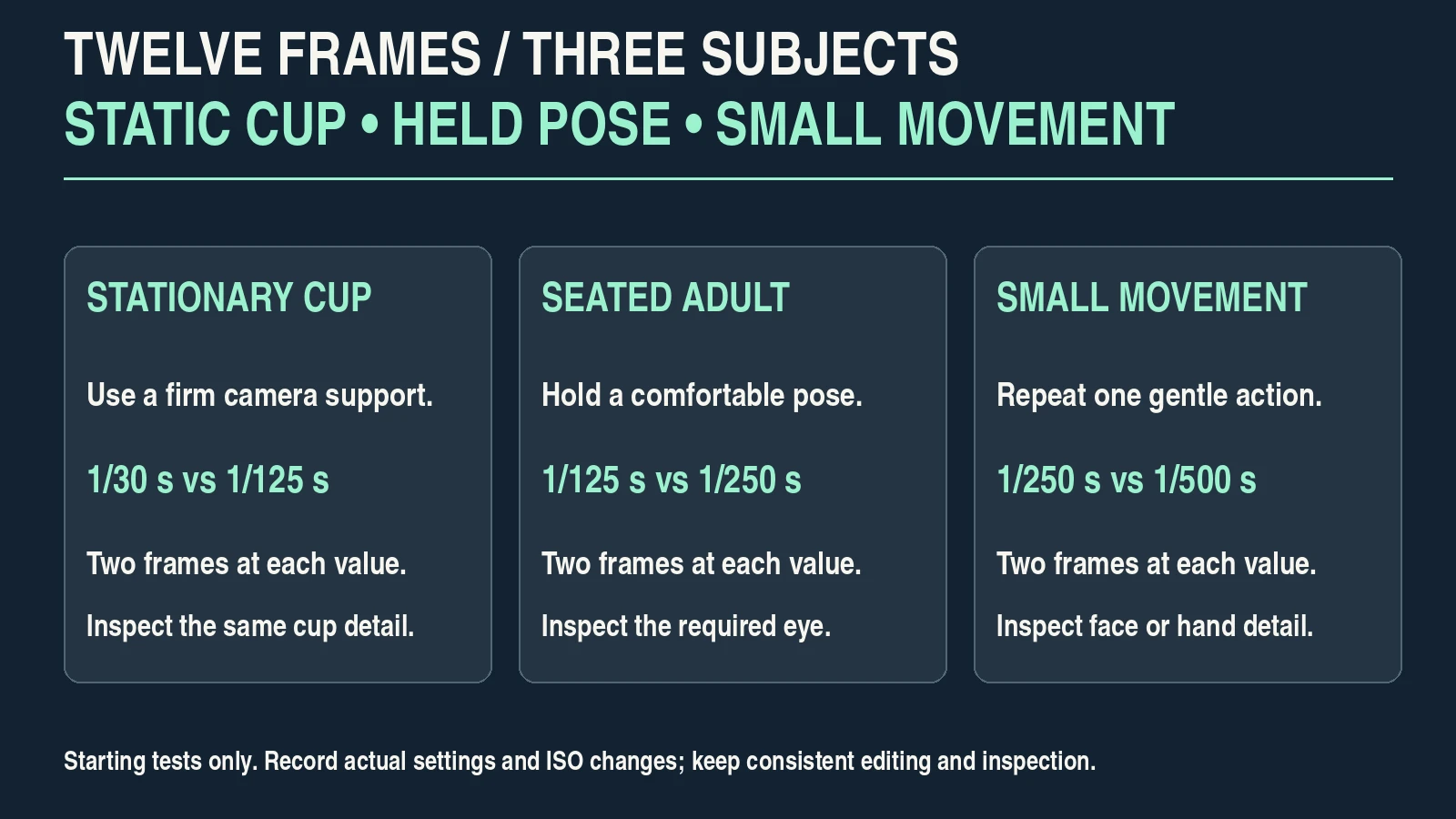
For each subject, photograph two shutter times, with two separate frames at each value. That produces twelve frames across the three subjects. Two frames are a small practical check, not a statistical test of autofocus or stabilization.
- Photograph the stationary cup using a firm support. Focus on the same detail and compare the first pair of shutter times.
- Photograph the seated adult holding a comfortable pose. Focus on the required eye and repeat the two-value comparison.
- Ask the same adult to make one gentle, repeatable movement. Repeat the comparison while maintaining focus on the intended detail.
- Record the actual settings and any changes in support, light or pose. Keep all twelve originals, including unsuccessful frames.
- Compare like-for-like images with the same editing treatment and magnification.
Use Auto ISO if it behaves as intended, or adjust ISO deliberately to keep broadly comparable brightness. Record those changes: this exercise explores a practical shutter-versus-image-quality compromise, not an isolated laboratory variable.
A supported cup may be clear at a shutter time that fails for a moving person. That result would indicate different requirements; it would not prove that the camera or lens is defective. If supported static detail is still soft, investigate focus, support movement and processing before drawing a conclusion.
7. Handle phones, artificial light and editing honestly
On a phone, a night-mode capture can take several seconds. Apple’s Night mode instructions recommend keeping the phone steady until the capture finishes. A still scene can work well while movement creates artifacts. If the app offers limited control, improve light, brace the phone and compare its standard and night modes using the actual subject. Do not assume a displayed capture duration represents one exposure.
Under artificial light, check several recorded frames for bands and inconsistent brightness or color. Test the supported anti-flicker setting and shutter options. A mechanical shutter may be worth comparing with an electronic shutter where available; it is not a guaranteed cure.
For example, Nikon’s Z6III photo flicker reduction has detection limits and does not operate with that model’s electronic shutter. Other cameras and light sources differ. Verify captured files, especially before an event you cannot repeat.
For editing, first choose the frame with the strongest required detail. Apply noise reduction and sharpening conservatively, then inspect the export. Heavy smoothing can erase texture; strong sharpening can add halos.
RAW may allow more processing flexibility, but it cannot guarantee recovery of clipped highlights or restore detail lost to movement. See RAW vs JPEG and the photo-editing workflow for the next steps.
8. Keep a settings record you can reuse
Write down what worked for the required output, including the failures. A settings record is more useful than remembering only the lowest ISO or the sharpest single frame.
| Record | What to enter |
|---|---|
| Scene and required detail | Location, light source, subject movement and the detail that must be clear |
| Equipment and support | Body or phone, lens/focal length, handheld or supported, stabilization setting |
| Actual capture settings | Shutter time, aperture, ISO, focus mode and selected target |
| Inspection | Original file, consistent edit, magnified detail and intended output size |
| Result and next decision | Acceptable or rejected; observed reason; one next change to test |
Use your record to make one specific adjustment. “The hand blurred at 1/250 second; compare 1/500 in better light” is actionable. “The image was bad” is not.
Before replacing equipment, repeat the test in stronger light. If the required detail becomes clear, the limitation may be the original light, motion requirement or exposure compromise. If the same error persists in a controlled static setup, consult the relevant equipment instructions or service support.
The useful outcome is a repeatable way to choose settings for your subject: control movement, place focus, secure the camera where helpful, and inspect the exported result. Keep the photographs as your own evidence.
Frequently asked questions
What settings should I use for sharp photos in low light?
Choose shutter time for the movement, aperture for required depth of field, and ISO for a suitable exposure. The three-subject comparison helps identify a workable combination for your equipment and output; there is no universal preset.
Does image stabilization stop a moving person from blurring?
No. Stabilization addresses camera movement. A moving face or hand may still blur during a long exposure even when the background is clear.
Should I keep ISO as low as possible?
Use an ISO that supports the required capture settings and a suitable exposure. A lower ISO number does not compensate for motion blur, missed focus or insufficient light.
Do I need an f/1.8 lens?
No. A wider maximum aperture can help exposure, but a kit lens can still be useful with better light, support or a less demanding subject. Very shallow depth of field can also make focus harder.
Should I disable stabilization on a tripod?
Check the exact camera and lens instructions. Recommendations vary with equipment and support conditions; do not apply a universal rule.
Can sharpening or AI editing fix a blurred photo?
They may improve appearance, but they cannot reliably restore the true detail lost to movement or missed focus. Choose a stronger original and evaluate the final export for artifacts.