
ND filters for video let you reduce light without immediately changing the shutter speed, aperture or ISO you chose for the shot. That makes them particularly useful when you want natural-looking movement and a particular depth of field outdoors. They solve an exposure problem; they do not automatically make footage cinematic.
Imagine filming someone walking across a sunny courtyard at 25 frames per second. You want a shutter speed around 1/50 second and enough background blur to separate them from the buildings. Without a filter, that combination may admit too much light. You could close the aperture or shorten the exposure, but either choice changes part of the image you wanted to preserve.
An ND filter gives you another control. This guide explains how to choose its strength, judge a variable filter, and run a short test before depending on it for a real shoot.
On this page
What an ND filter changes and what it leaves to you
A neutral density filter reduces the light entering the lens. Ideally, it does so without changing color. In practice, neutrality, flare resistance and uniformity vary, so assess the actual filter and lens combination you use.
Adding ND does not change perspective, create shallow depth of field by itself, stabilize a camera or fix clipped footage after recording. It lets you keep an aperture or shutter setting that would otherwise overexpose the scene. You still need to expose correctly, focus accurately and choose a suitable frame rate.
For many everyday shots, a shutter exposure approximately half the frame interval is a useful starting point: roughly 1/50 at 25 fps or 1/100 at 50 fps. This is the familiar 180-degree shutter approach. It is a convention, not a requirement. Faster exposures can be useful for sharper individual frames; longer exposures can deliberately create more blur. Artificial lights may require a different shutter setting to avoid flicker.
Read Pixanded’s frame-rate guide before selecting the filter. Decide what the motion should look like first; use ND to support that decision rather than letting bright sunlight make it for you.
Understand stops before shopping
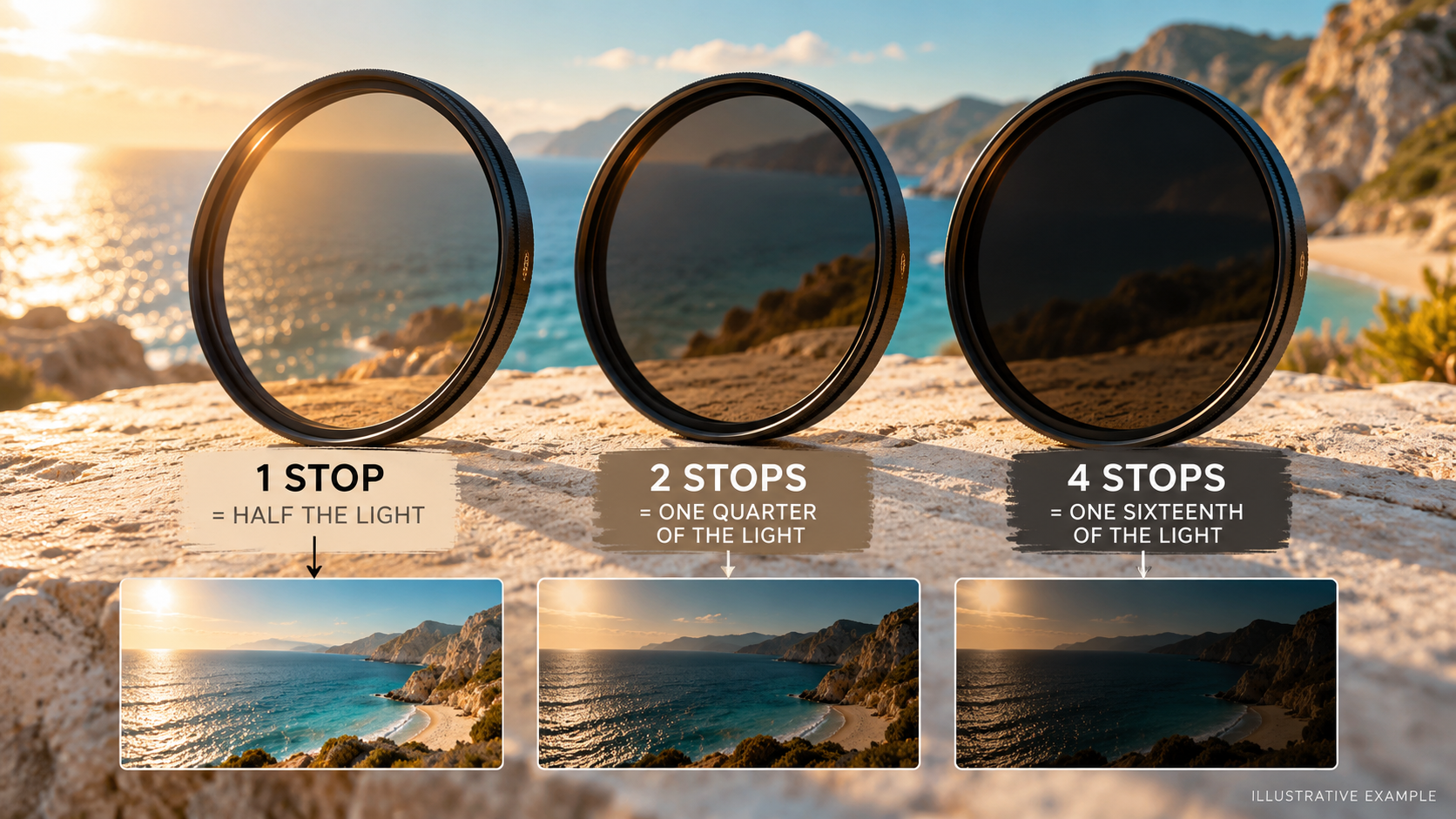
One stop of ND halves the light. Two stops admit one quarter; three admit one eighth. The relationship is exponential, which explains why a small-looking increase in the stop number can make a large exposure difference.
Manufacturers use several naming systems. A filter factor such as ND8 is different from an optical-density marking such as ND 0.9. Read the product specification rather than assuming that every number means stops.
| Light reduction | Filter factor | Optical density | Light transmitted |
| 1 stop | ND2 | 0.3 | 50% |
| 2 stops | ND4 | 0.6 | 25% |
| 3 stops | ND8 | 0.9 | 12.5% |
| 4 stops | ND16 | 1.2 | 6.25% |
| 5 stops | ND32 | 1.5 | About 3.1% |
| 6 stops | ND64 | 1.8 | About 1.6% |
These are mathematical equivalents, not measurements of any particular filter. They are useful for translating labels and estimating a starting point.
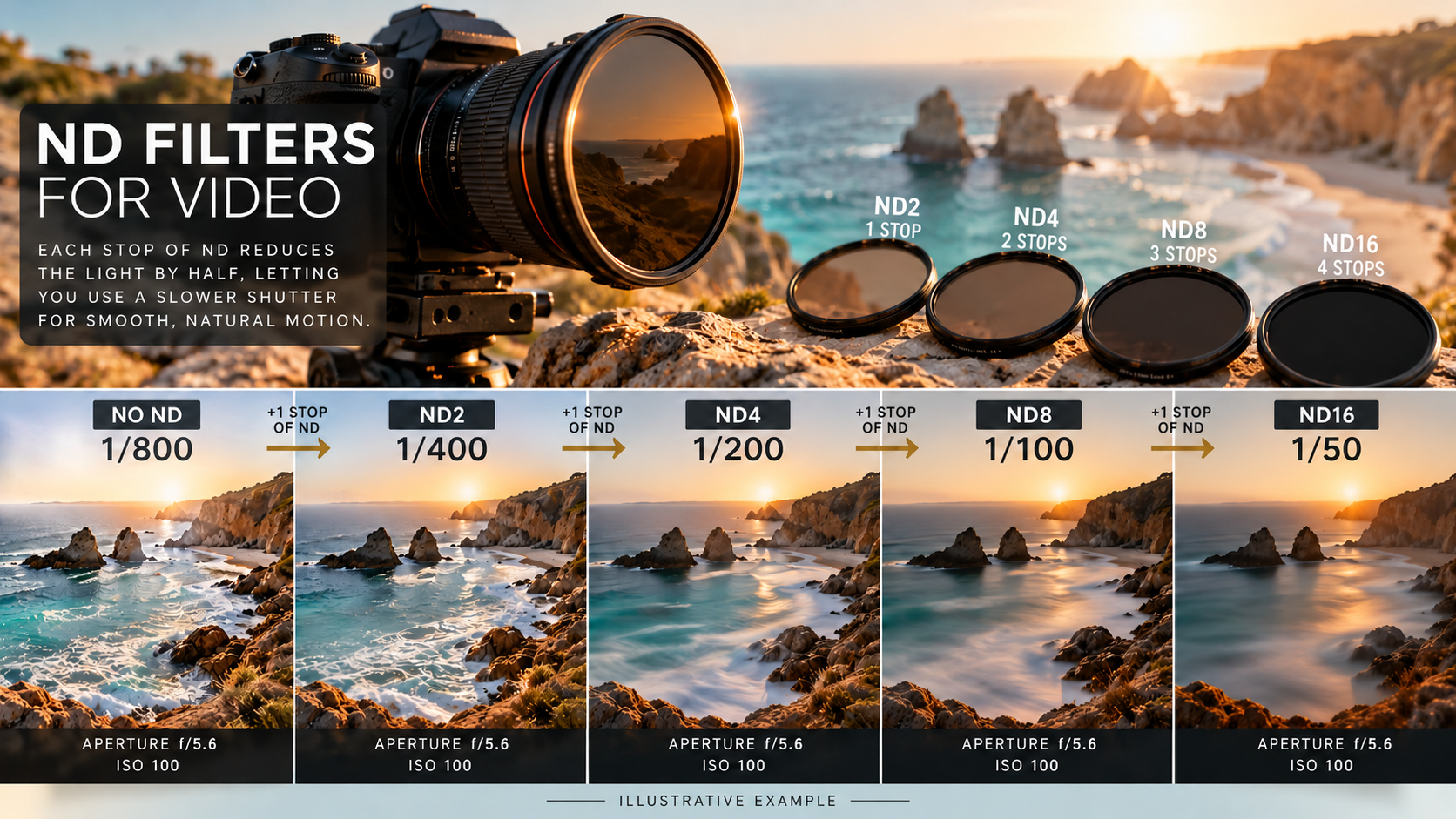
Suppose correct exposure without ND requires 1/800 second, while your intended shutter is 1/50. The sequence is 1/800 → 1/400 → 1/200 → 1/100 → 1/50. That is four stops. An approximately four-stop filter should bring you close if aperture, ISO and lighting remain unchanged. Confirm the result using the camera’s exposure aids.
Do not select a strength solely from the words “sunny day.” Bright sand, shaded streets, cloud cover, lens aperture and a camera’s chosen ISO can all change the requirement.
Fixed ND or variable ND?
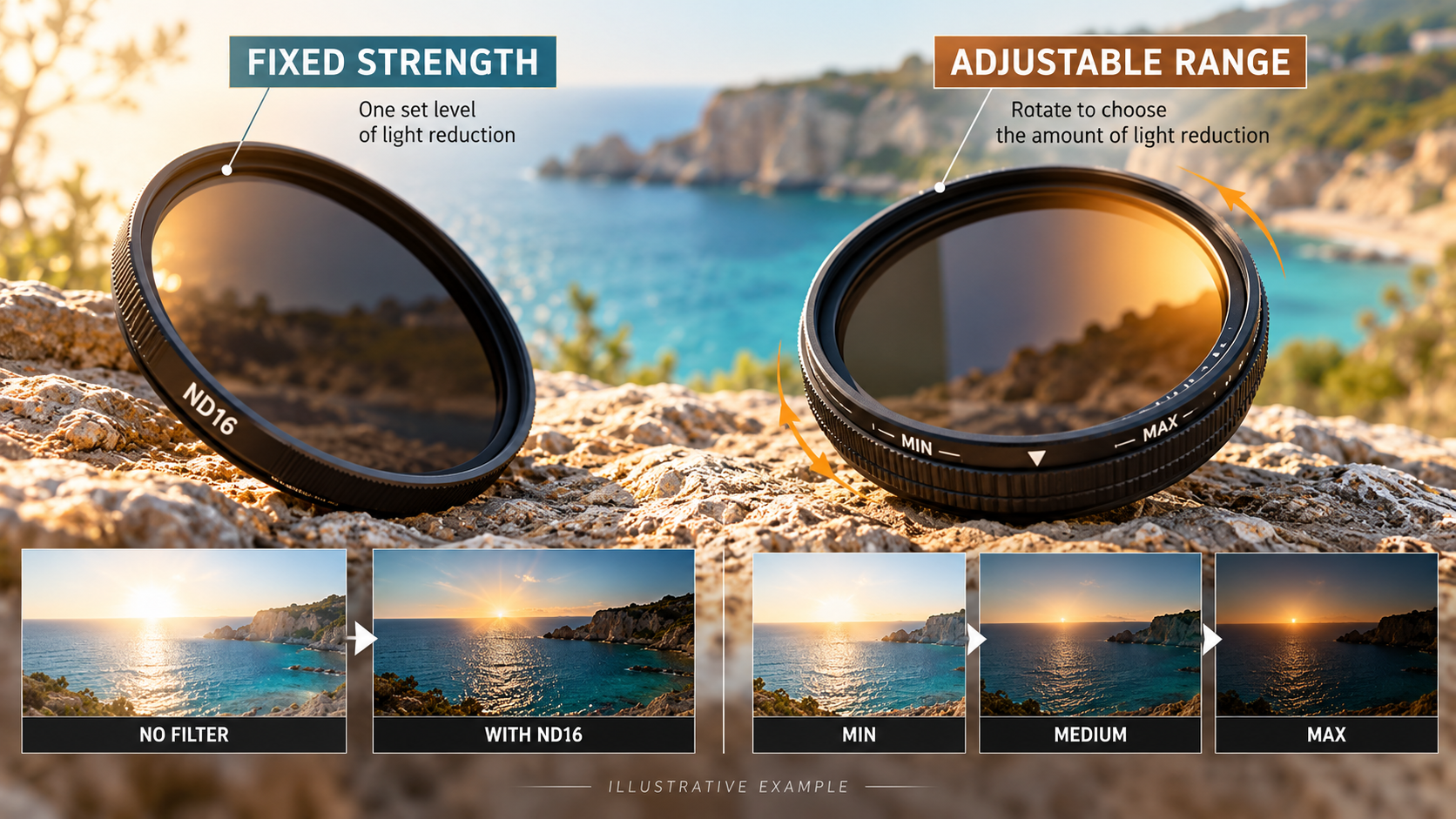
A fixed filter has one intended density. A variable ND lets you adjust attenuation by turning its ring. Tiffen’s variable ND guidance describes this rotating control; consult the instructions for your own model because usable ranges and markings differ.
| Your priority | A sensible starting choice | What to check |
| Repeatable exposure across takes | Fixed ND | Enough strengths for the conditions |
| Quickly adapting during an outdoor shoot | Variable ND | Uniformity throughout its usable range |
| Very wide lenses or broad areas of sky | Test either carefully | Uneven density, corners and polarization effects |
| A camera with built-in ND | Start with the built-in system | Available increments and operating instructions |
Fixed filters can be straightforward for a controlled setup. Their inconvenience is swapping strengths when the light changes. A variable filter is convenient when working alone, but its maximum marking is not a promise that every lens and composition will look clean at that setting.
Check the filter thread size printed on the lens, not the lens’s focal length. Step-up rings can allow one larger filter to serve several smaller-thread lenses, but may interfere with hoods and caps. Confirm physical clearance and mounting compatibility before buying. A bigger filter cannot guarantee freedom from every optical problem.
Avoid stacking filters by default. Extra glass and mounting rings can introduce flare, reflections or dark corners. If stacking is necessary, test the actual combination at your widest intended focal length.
A field workflow that keeps creative choices intact
1. Set the recording format
Choose frame rate and resolution for the project. If you plan slow motion, decide which shots need it before setting exposure. A 50 fps recording and a 25 fps recording generally need different shutter starting points.
2. Choose shutter and aperture deliberately
Set the shutter for the movement you want. Choose the aperture for the required depth of field, not simply the widest setting available. A walking subject may need more focus tolerance than a static close-up. Use Pixanded’s autofocus guide when movement and shallow focus make sharpness inconsistent.
3. Select an appropriate ISO
Use the camera manufacturer’s guidance for the recording mode. A standard picture profile and a log profile may have different recommended ISO settings. Do not force an arbitrary low ISO if it changes the mode’s intended operation.
4. Add enough ND to reach exposure
With a fixed filter, choose the nearest suitable strength and refine exposure if necessary. With a variable filter, begin toward the lighter end of its usable range and rotate while checking the entire frame.
Use a histogram, waveform or zebras where available. A bright outdoor screen can make an overexposed image seem normal. Pixanded’s histogram guide explains how to combine a visual impression with exposure evidence.
5. Check color, corners and movement
Record a short clip with the filter fitted. Look at faces, pale walls, sky and frame corners. Pan gently and watch for flare as the angle to the sun changes. Review on a larger display when possible. A filter that looks acceptable in one static composition may reveal problems in another.
Why variable ND sometimes produces an X-shaped pattern
Many variable ND designs use interacting polarizing elements. At stronger settings, some combinations of focal length, density and scene can show uneven darkening or a cross-like pattern. A broad sky or plain wall makes unevenness easier to see than a busy background.
The Tiffen variable ND user guide discusses high-density artifacts and notes that its intermediate ring dots are references rather than calibrated stop values. That is a useful reminder to check the image instead of treating the ring as a precision meter.
If the frame develops an obvious pattern, reduce the density rather than assuming grading will remove it. Consider a suitable fixed filter, a different tested variable range, or a change in aperture that still meets the shot’s needs. Changing focal length may help, but do not sacrifice necessary framing without thinking through the result.
A polarizing filter is also not a universal replacement for ND. It is used to manage certain reflections and polarization effects, and its result depends on angle and material. ND’s main purpose is light reduction. Combining the two functions requires checking both exposure and the appearance of the scene.
Run a 20-minute filter test
Choose a scene with a person or textured subject, a pale surface and some sky. Use a tripod or stable support. Keep framing, aperture, ISO, white balance and the light as consistent as practical.
First record a correctly exposed reference without the filter, using a faster shutter if necessary. Then fit the filter, choose your intended slower shutter and match exposure. The two clips will differ in motion blur, so use stationary areas for color and detail comparisons.
For a variable filter, record low, middle and strong settings while compensating exposure for each comparison. Include your widest lens setting and a tighter framing. Write down the filter position, lens, focal length and any visible problems. This is a practice protocol, not a claim that a particular filter has passed laboratory testing.
Review the files at normal playback speed, then inspect a still frame at a useful magnification. Ask whether the subject’s color shifts, corners darken, flare becomes distracting, or detail looks less clear. Evaluate a normal export too; enlarging tiny differences far beyond the delivery size can distort their practical importance.
Keep one short reference sequence in your project folder. It is more useful than relying on memory when deciding how far to rotate the filter on a later shoot.
Troubleshoot the actual symptom
| Symptom | First check | Practical response |
| Image remains too bright | Filter strength and camera settings | Use more suitable ND or revise a creative setting deliberately |
| X-shaped or uneven darkening | Strong variable setting and wide framing | Reduce density; test a fixed alternative |
| Unexpected color shift | White balance and matched exposure | Compare a neutral reference; avoid mixing inconsistent filters |
| Dark corners | Filter size, stacked rings and focal length | Remove unnecessary stacking and test clearance |
| Soft subject | Focus, motion and dirty filter surface | Diagnose each separately; clean according to instructions |
| Flicker under lights | Shutter and local lighting | Change the shutter after a recording test |
Do not blame every soft frame on the glass. Missed focus, camera movement and subject blur can look similar at first glance. Likewise, lowering exposure does not repair recorded highlight clipping: preventing clipping during capture is the point.
Separate motion preference from exposure correction
A bright scene tempts beginners to raise shutter speed until the picture looks darker. That can be a valid creative choice, but it changes how motion is rendered. If you want to retain your chosen shutter behavior and aperture, use ND as another exposure control rather than letting brightness dictate every setting.
For an illustrative 25-frame-per-second recording, a shutter time around 1/50 second is a common starting point for familiar motion blur. It is not a requirement for every shot. Fast action, deliberate crispness, flickering light and camera limitations can justify another setting. Choose the motion you want, then evaluate it on an actual recording instead of treating a guideline as a guarantee.
Aperture also has a purpose. You may choose it for depth of field, focus tolerance or lens performance. If you close it only because the scene is bright, the background and focus demands may change. Decide what must remain visible and how reliably you can keep the subject sharp. ND helps preserve that decision when suitable strength is available.
Make a short comparison before an important shoot. Record a walking subject with your intended settings, then try a faster shutter without changing the framing. Watch the recordings at the intended playback speed. Describe the visual difference you see; do not claim a setting is universally more professional simply because one version matches your preference.

Calculate a filter requirement before turning the ring
Suppose that correct exposure without ND requires 1/800 second, while your intended shutter is 1/50 second. Keep aperture and ISO unchanged for this calculation. Moving through 1/400, 1/200, 1/100 and 1/50 adds four stops of exposure. A four-stop reduction in incoming light is therefore the starting ND requirement for that example.
This is arithmetic, not a promise that a particular filter’s ring marking is exact. Actual transmission, scene changes and exposure settings need checking. Use the camera’s exposure tools appropriately and review important highlights. If your camera’s preview is affected by a display setting, do not assume screen brightness alone represents recorded exposure.
Filter naming can be confusing. A label such as ND16 commonly describes a reduction factor of sixteen, corresponding to four stops, while an optical-density label of 1.2 expresses the same nominal attenuation differently. Confirm the manufacturer’s labeling scheme for the product you are considering. A number without its scheme can be misread.
Write the planned recording settings and required reduction on a small field card. When the light changes, return to those choices instead of immediately changing everything. If you need a different aperture for the next shot, recalculate or reassess the ND. The purpose is repeatability, not forcing every scene to share identical numbers.
Choose the physical system for the way you shoot
Check the lens’s filter-thread size and whether the lens has a suitable front thread. Confirm that any adapter fits securely and does not interfere with the lens or other accessories. A filter that is optically suitable but mechanically awkward can slow you down or create avoidable handling mistakes.
A step-up ring can let a larger filter fit a smaller lens thread, but check hood compatibility, clearance and corners at the focal lengths you use. Stacking several rings or filters increases the physical assembly in front of the lens. Test for shading and reflections rather than assuming an adapter is harmless in every configuration.
A variable ND is convenient when light changes quickly, but its usable range matters. A fixed ND is straightforward when you know the reduction you need, although changing strength can require a physical swap. Neither design is automatically the right purchase for every beginner. Choose according to your actual recording situations and willingness to change filters.
Pack a clean protective case and handle the filter by its edges where possible. Inspect the glass under useful light before fitting it. Smudges can become more noticeable in backlight or around bright sources. Clean according to the manufacturer’s instructions; aggressive wiping and random cleaning chemicals are not a substitute for careful handling.

Test color and unevenness with a stable scene
Use a scene with a plain wall or sky, a neutral reference and recognizable fine detail. Fix camera position, focus, exposure choices and white balance where appropriate for the comparison. Record a short reference without the filter when exposure permits, then record at several practical filter settings.
Compare the whole frame, including corners. Look for uneven darkening, a color shift, glare or a change in fine detail. Use the same playback and viewing conditions when assessing the clips. Do not attribute a difference to the filter if you also changed white balance, exposure or focus between recordings.
A variable ND’s dark cross pattern is a reason to move back into its usable range or change your exposure approach. Tiffen’s variable-ND information is a product-specific starting reference; follow the instructions for the filter you own. Different lenses, angles and lighting conditions deserve their own checks.
Keep the test clips with clear labels. You do not need to publish a supposed laboratory result. The practical outcome is a note telling you which settings were usable with your lens and shot type. Repeat the check after changing the lens, adapter arrangement or filter system.
Make a small outdoor sequence with consistent intention
Plan three shots: a wider establishing view, a moving subject and a closer detail. Choose the frame rate and shutter behavior intentionally, then select aperture and focus for each view. Use ND to bring exposure into the desired range rather than treating the filter position as a fixed setting for the whole sequence.
Watch for changing light across the shots. A cloud can alter brightness and contrast while you are adjusting the camera. Record a short test after a substantial change and check the important highlights. Keep the subject’s face and the sky in mind when deciding what to protect.
For the moving shot, review both exposure and focus. A shallow aperture that looks attractive in a still frame can be difficult to maintain during movement. Adjust the creative plan if the subject is consistently soft. ND controls incoming light; it does not improve autofocus, stabilization or the subject’s performance.
Finish by comparing the three clips together. Check whether the motion feels coherent, whether the color changes unexpectedly and whether the cut exposes a brightness jump. Record what you changed and why. That short record turns a filter from another accessory into part of a repeatable shooting process.
Frequently asked questions
Do I need ND for every outdoor video?
No. You need it when the exposure required by the scene conflicts with the aperture, shutter and ISO you want to use. Shade, a narrower aperture or a different creative shutter choice may remove the need.
Which strength should a beginner buy first?
Measure the gap between correct exposure and your intended settings. Test that calculation in your common shooting conditions. One universally recommended strength cannot cover every camera, lens and subject.
Will ND improve background blur?
It can let you use a wider aperture in bright light, which may produce shallower depth of field. The filter itself does not create blur; aperture, distances, focal length and framing still determine the result.
Can I fix a variable ND cross pattern in editing?
It is better to avoid it while recording. Uneven attenuation across the frame can be difficult to correct consistently, especially when the camera or subject moves.
Should I leave the filter on indoors?
Remove it when its light reduction is unnecessary. Otherwise, you may need a higher ISO, a wider aperture or a longer exposure to compensate. Check the filter again when moving between lighting conditions.
Your next shoot
Choose one ordinary outdoor shot and write down its intended frame rate, shutter and aperture. Calculate a starting ND strength, record a short comparison and inspect the whole image. Keep the filter only if it preserves the shot you wanted without introducing a more distracting problem.