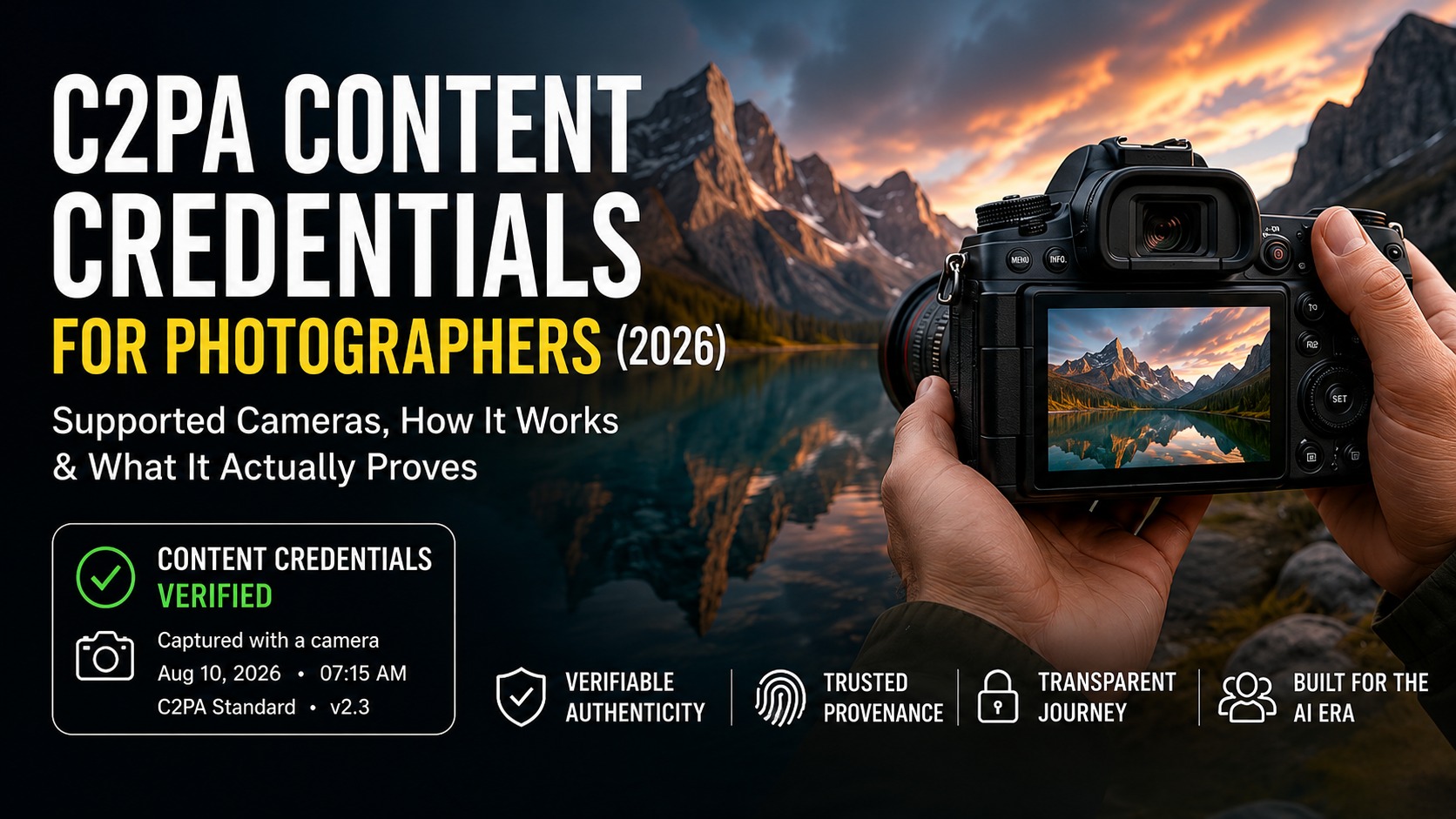
Content Credentials for photographers are moving from an abstract anti-misinformation idea into a real camera feature. In 2026, photographers can already buy or update cameras that attach cryptographically signed provenance information at capture, while editing tools, cloud services and platforms are beginning to preserve or display that history.
That sounds simple: take a photo, prove it is real.
But that is not exactly what C2PA does.
Content Credentials can help establish where a file came from, which trusted device or software signed parts of its history, and how the file changed through a compatible workflow. They can make tampering easier to detect and can provide valuable context about capture and editing. They do not automatically prove that the scene itself was truthful, that a caption is accurate, that a photographer was not staging the scene, or that every missing credential means a photo is fake.
That distinction matters more than ever as AI-generated images and increasingly convincing synthetic video make visual trust harder to judge.
This guide explains C2PA for photographers without the marketing fog: how it works, which camera systems are using it, where it helps, where it breaks, what platforms can display, and whether you should care when choosing your next camera or professional workflow.
Table of Contents
What Are Content Credentials for photographers?
Content Credentials are provenance information attached to digital media using the open technical standard developed by the Coalition for Content Provenance and Authenticity (C2PA). The standard is designed to record the source and history of content in a way that can be cryptographically validated.
The idea is similar to a tamper-evident history attached to a photo or video. Depending on the device and workflow, that history can include information such as:
- the device or software that signed the content;
- capture-related metadata;
- when a credential was issued or updated;
- editing actions recorded by compatible software;
- whether the signed information still validates;
- additional assertions about how the file was created or transformed.
C2PA 2.x also includes a formal trust and conformance ecosystem. The C2PA Conformance Program checks whether generator and validator products implement the specification and security requirements correctly, and conforming products can appear on public C2PA lists.
This matters because provenance is only useful when the software reading it can trust the signer and understand the format.
Authoritative source: C2PA Conformance Program
Why Photographers Should Care Now
For years, photographers mainly thought about authenticity in terms of EXIF data, RAW files, copyright notices, watermarks or forensic analysis. Generative AI changes the problem.
A convincing image can now be created without a camera at all. A real photograph can also be heavily transformed after capture. Meanwhile, viewers increasingly ask whether striking images are genuine—even when the photographer actually made them traditionally.
Content Credentials respond to that environment by moving some trust information closer to the moment of capture.
For a working photographer, that can become useful in five areas:
- Photojournalism and news — newsrooms can receive media with provenance records that begin in the camera.
- Documentary work — a verifiable capture history can strengthen confidence in how an image entered the workflow.
- Commercial photography — clients may eventually request provenance-preserving delivery for sensitive or high-value work.
- Competitions and institutions — credential history may complement existing submission rules, although it should not replace editorial review.
- Personal brand trust — photographers working in an AI-saturated market may use verified capture as one more way to demonstrate process transparency.
C2PA adoption is no longer limited to a single camera experiment. The organization announced Content Credentials 2.3 in February 2026 and said more than 6,000 members and affiliates had live applications across the ecosystem.
Authoritative source: C2PA — Content Credentials 2.3
How C2PA Works in a Camera Workflow
A simplified camera-to-publication workflow looks like this:
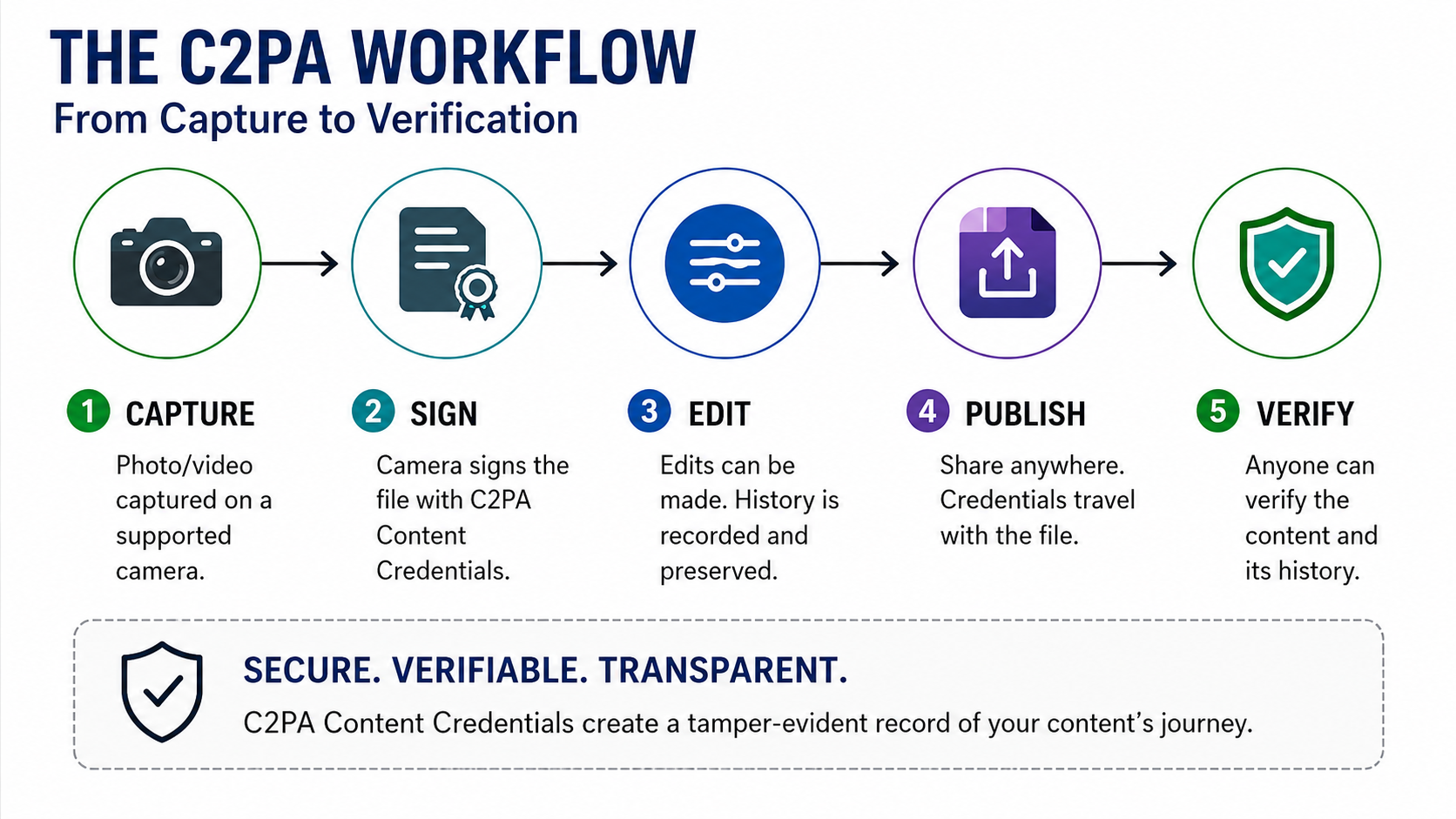
Step 1 — Capture
A supported camera records the photograph and creates signed provenance information. The exact implementation differs by manufacturer. Some systems are deeply integrated into the camera hardware; others rely on firmware, certificates, cloud registration or paid activation.
Step 2 — Transfer
The file must move through a workflow that does not strip or break the credential. A normal copy may preserve it, but unsupported software, export settings, messaging services or recompression can interrupt the chain.
Step 3 — Editing
A C2PA-aware editor can preserve the previous history and append information describing edits. The goal is not necessarily to forbid editing. Normal editorial changes can remain part of a transparent history.
Step 4 — Publication
A compatible publisher, platform or verification tool can validate the signed credential and present the available history to the viewer.
This is why C2PA is an ecosystem feature, not simply a camera checkbox. A credential created perfectly at capture can lose practical value if the rest of the workflow ignores or destroys it.
Content Credentials vs EXIF Metadata
Photographers already have EXIF metadata, so why is C2PA different?
EXIF can contain useful capture information such as camera model, lens, shutter speed, aperture, ISO and time. But ordinary metadata fields can often be modified or stripped without a cryptographic trust model.
C2PA adds a signed provenance structure around claims about the asset and its history. In practical terms:
| Feature | EXIF | C2PA Content Credentials |
|---|---|---|
| Camera settings | Often yes | May be included as signed provenance assertions |
| Cryptographic validation | No standard trust chain | Yes, when implemented and validated correctly |
| Edit history | Usually no reliable chain | Compatible tools can add provenance records |
| Can be stripped | Yes | Credentials can also be removed or broken; durable approaches are still evolving |
| Proves scene is truthful | No | No |
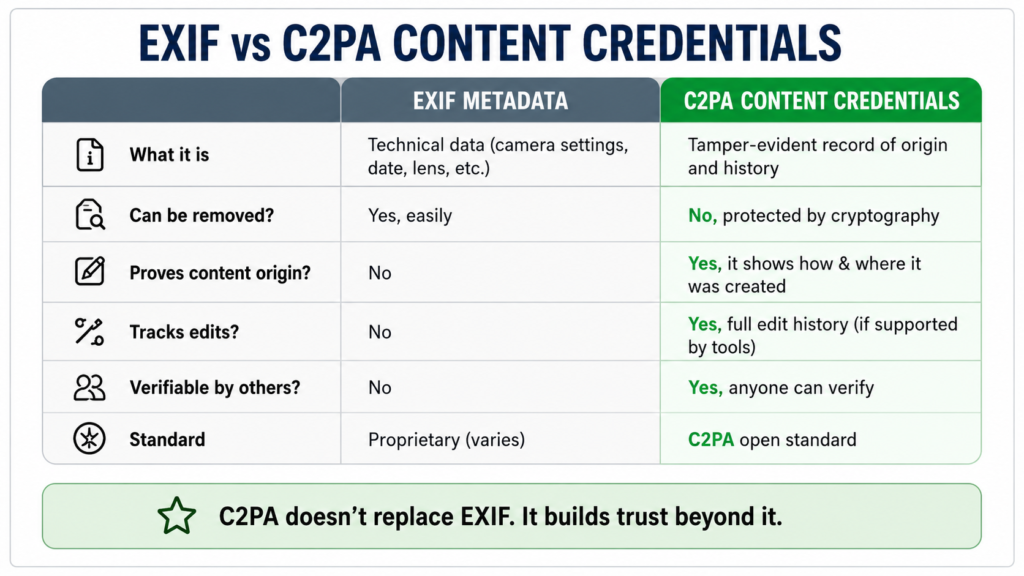
C2PA is therefore not “better EXIF.” It is a broader provenance and trust framework.
What Content Credentials Actually Prove
This is the most important section of the guide.
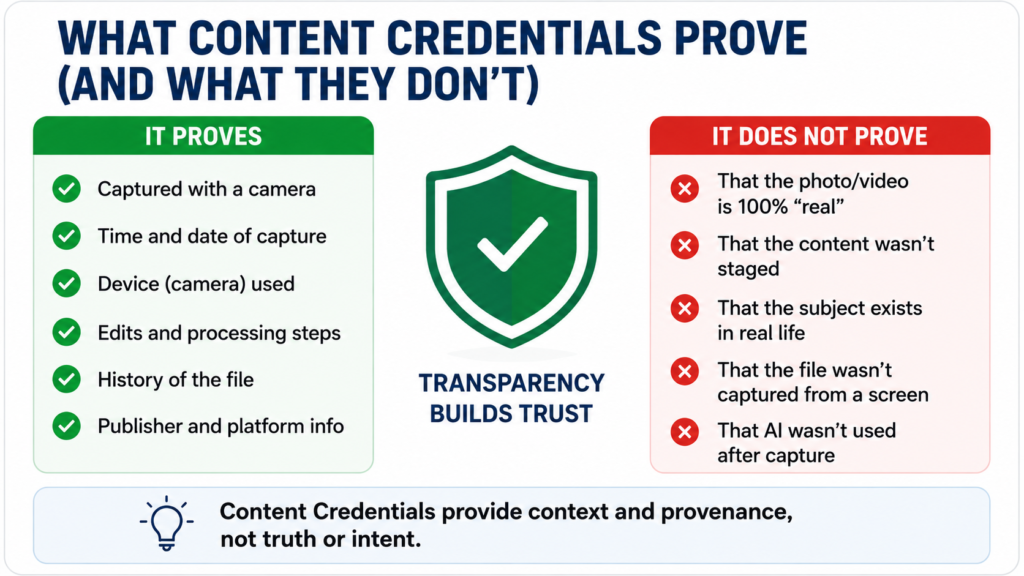
When a credential validates successfully, it can provide evidence about the signed provenance claims attached to that asset. Depending on the implementation, this may help establish that:
- a particular trusted device or software signed the content;
- the signed metadata has not been silently altered without invalidating the credential;
- certain edits were added through compatible software;
- a file has a traceable history back to a capture or creation step;
- the current credential chain is valid under the relevant trust model.
For example, Nikon says its Z6III provenance function can add equipment metadata and digital-signature information so that users can demonstrate that a photo was captured with a Nikon camera. Canon’s 2026 Authenticity Imaging System is designed to preserve provenance from supported EOS R1 and EOS R5 Mark II capture through newsroom workflows.
Official sources: Nikon Z6III Authenticity Service · Canon Authenticity Imaging System
What Content Credentials Do NOT Prove
Content Credentials do not automatically tell you whether an image is “true” in the broad human sense.
They do not by themselves prove:
- that the scene was not staged;
- that the subject identification or caption is correct;
- that the photographer’s interpretation is unbiased;
- that events outside the frame did not change the meaning;
- that a credential-free file is fake;
- that every credentialed file should be trusted without context;
- that an image cannot have been created by photographing a screen, print or synthetic scene;
- that a platform preserved every part of the original provenance chain.
Google Photos states this clearly in its own Content Credentials help: provenance information can help users make informed decisions, but it does not itself tell users whether a photo is real or fake.
Official source: Google Photos — How photos were made
The safest mental model is:
C2PA can authenticate parts of a media history. It cannot authenticate the meaning of reality.
Cameras With Content Credentials in 2026
The list changes quickly. Firmware, certificates, subscription plans and regional availability can change after this article is published. Always confirm current support with the manufacturer before buying a camera specifically for C2PA.
The following are officially verified examples as of 12 August 2026, not a claim that every compatible model worldwide is listed.
| Brand | Officially verified examples | Implementation notes |
|---|---|---|
| Canon | EOS R1, EOS R5 Mark II | Canon Authenticity Imaging System; C2PA functionality requires paid activation; initial 2026 rollout began in Europe, Middle East and Africa. |
| Nikon | Z6III | Nikon Authenticity Service via firmware 2.00; Nikon Imaging Cloud registration and certificate application required; availability varies by region. |
| Leica | M11-P, M11-D, SL3-S, SL3-P, M EV1, Q3 Monochrom | Leica lists these on its current Content Credentials page; implementation is integrated into supported cameras. |
| Sony | α7 V, α7R VI | Current Sony product pages advertise Camera Authenticity Solution as a paid service. Sony also documents authenticity workflows across additional Alpha/Cinema products, so verify the current license/model list before purchase. |
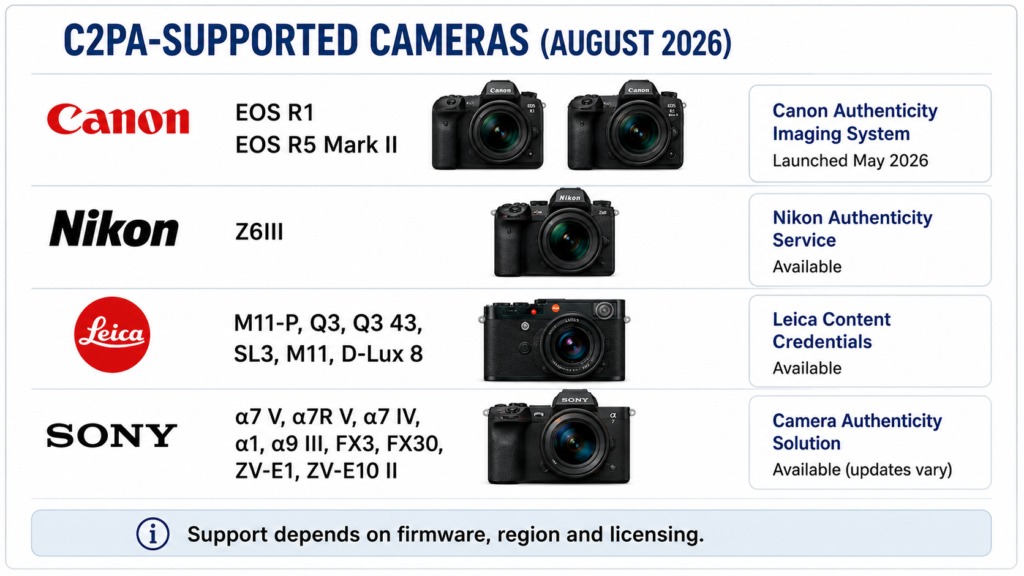
Official sources: Canon · Nikon · Leica · Sony α7 V · Sony α7R VI
Canon: newsroom-first authenticity
Canon’s Authenticity Imaging System launched in May 2026 for the EOS R1 and EOS R5 Mark II, initially in EMEA. The system is designed around professional image provenance, certificates, trusted timestamps and history verification. Canon says Reuters participated in initial technical testing.
For a working news photographer, Canon’s approach is important because it treats provenance as part of an organizational publishing workflow rather than just a badge inside the camera.
Nikon: provenance through Imaging Cloud
Nikon added its first C2PA-compatible authenticity workflow to the Z6III with firmware 2.00. Users need Nikon Imaging Cloud registration and an approved digital certificate. Nikon also warns that some shooting performance can be restricted while provenance recording is enabled.
That operational detail is important: authenticity features can have workflow costs, not just benefits.
Leica: authentication built into the camera experience
Leica was the first major camera maker to put Content Credentials directly into a production camera with the M11-P. Its current Content Credentials page lists several supported models, including the M11-P, M11-D, SL3-S, SL3-P, M EV1 and Q3 Monochrom.
Leica’s implementation is especially relevant to documentary and fine-art photographers because provenance is presented as a core camera capability rather than a newsroom add-on.
Sony: camera signatures extending into video
Sony’s Camera Authenticity Solution uses signed information from supported cameras and has expanded beyond still photography. Current Sony camera pages such as the α7 V and α7R VI advertise the solution, and Sony has also demonstrated professional video provenance workflows.
This is a major direction to watch because synthetic video is advancing rapidly and provenance for moving images may become as important as provenance for stills.
Buying for authenticity features? Verify the exact camera model, firmware, activation requirements and regional availability with the manufacturer before purchasing.
Can You Verify Content Credentials After Editing?
Yes—if the editing software supports the standard and preserves the chain.
The whole point of provenance is not to demand an untouched image. Professional photography often requires legitimate edits: cropping, exposure adjustment, color correction, resizing, captioning and export.
A compatible editor can append information to the provenance history so that a viewer can see that the asset changed after capture without silently pretending it is the untouched original.
But this depends on software support. If an unsupported tool exports a new file without preserving credentials, the visible provenance chain can be interrupted.
That means photographers interested in Content Credentials should test their entire production path
Do not assume the credential survives simply because it existed in-camera.
What Happens When You Upload to Social Platforms?
Platform behavior is evolving quickly.
YouTube has a “Captured with a camera” disclosure for videos when it detects compatible secure C2PA metadata. Its help documentation says the workflow requires supported capture/editing tools and warns that using software that does not support the required C2PA version can break the provenance chain.
Google Photos can display Content Credentials information in its mobile apps under “How this was made”, including information about camera capture and AI-related edits when supported.
This does not mean every social network preserves every credential. Compression, re-encoding and platform-specific processing can affect what survives.
Official sources: YouTube — Captured with a camera · Google Photos Content Credentials
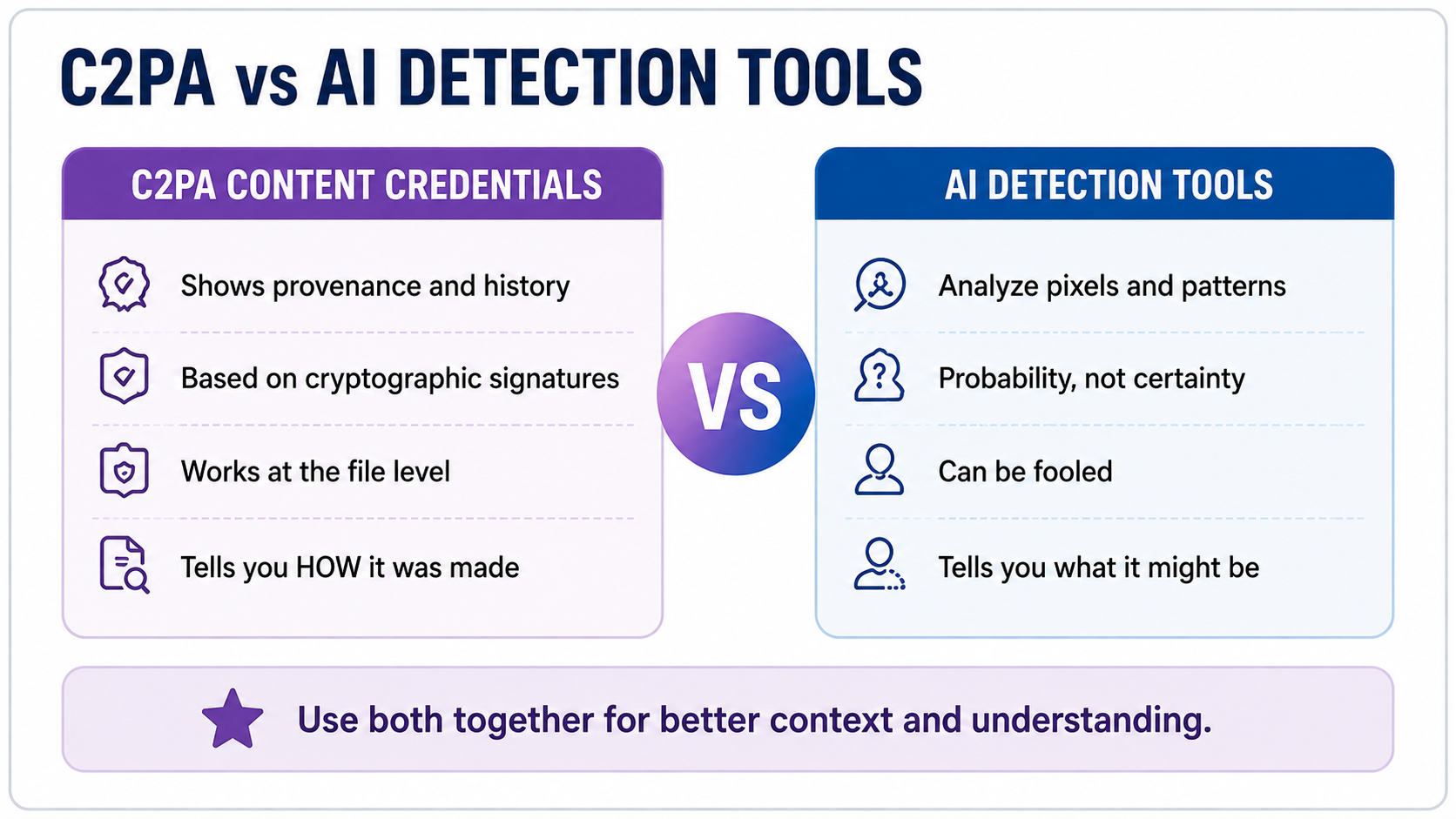
C2PA vs AI Detection
C2PA takes a different approach from AI detectors.
An AI detector looks at a finished file and tries to infer how it was made. That is a classification problem, and the output is probabilistic.
C2PA tries to attach verifiable information during creation and editing. Instead of asking only, “Does this file look AI-generated?” it asks, “What trusted parties signed the history of this file, and what does that history say?”
Neither approach is perfect.
AI detection can be wrong. Provenance can be missing, broken, stripped, poorly implemented or misleadingly interpreted. The strongest verification workflows may combine provenance, source reputation, forensic analysis, editorial checks and contextual evidence.
For photographers, this is good news: C2PA is not trying to replace photography expertise. It adds another layer of evidence.
The Biggest Limitations Photographers Need to Understand
1. No credential does not mean fake
Millions of legitimate photographs come from cameras and workflows that do not use C2PA. A missing credential is an absence of provenance evidence, not proof of synthetic origin.
2. The workflow can break
Unsupported editing, file conversion, messaging apps, exports or platform processing may strip or invalidate the credential.
3. Availability differs by country and business model
Some camera makers require registration, certificates, licensing or paid activation. A feature shown on a global product page may not be available to every buyer in every country.
4. “Camera captured” is not the same as “scene truthful”
A camera can photograph a screen, a print, a staged event or an intentionally misleading composition. Provenance helps verify the media chain; it does not replace journalism, context or human judgment.
5. Trust depends on implementation
C2PA has a formal conformance program precisely because implementation quality matters. Photographers working in high-stakes environments should distinguish between simply seeing C2PA-like metadata and validating a credential from a trusted, conforming implementation.
Should You Buy a Camera Because It Supports C2PA?
For most photographers in 2026, C2PA should be a secondary buying factor, not the first one.
Image quality, autofocus, ergonomics, lens ecosystem, reliability, video requirements and total system cost still matter more for general photography.
But C2PA becomes much more important if you work in:
- journalism;
- documentary photography;
- evidence-sensitive commercial work;
- institutional communications;
- government or research;
- competitions where authenticity rules are becoming stricter;
- high-value client work where provenance could reduce disputes.
If two cameras already meet your photographic needs, provenance support can become a meaningful differentiator.
The practical question is not just “Does this camera support C2PA?” Ask:
- Is the feature available in my country?
- Does it require a paid license or enterprise account?
- Does it work for stills, video or both?
- Does it affect burst rate or camera performance?
- Which editors preserve the credential?
- Does my publishing platform display it?
- Can my clients or newsroom actually verify it?
A Practical C2PA Workflow for Photographers
If you want to experiment with Content Credentials today, use a controlled test before relying on the feature professionally.
Step 1 — Confirm current camera support
Check the manufacturer’s current support page, firmware version, license requirements and region availability.
Step 2 — Activate the required certificate or service
Depending on the brand, this may happen in-camera, through a cloud service, or through a paid professional activation.
Step 3 — Capture a test sequence
Photograph a simple scene and keep the original file. Record your camera and firmware version.
Step 4 — Verify the original credential
Use the manufacturer’s verification tool or a compatible Content Credentials verifier to confirm that the original file validates.
Step 5 — Edit with compatible software
Perform normal edits such as crop, exposure and color adjustment. Export using a workflow that preserves provenance.
Step 6 — Verify the edited file
Check whether the original capture history remains visible and whether the edit step was added correctly.
Step 7 — Test your publishing destination
Upload to the exact CMS, cloud service or video platform you use professionally. Download or inspect the final public version and verify again.
Step 8 — Document the workflow
For a newsroom, agency or client team, write down the approved path so other software does not accidentally break provenance.
How to Verify Whether a Photo Has Content Credentials
The exact viewer depends on the source and workflow, but the basic process is:
- Open the file in a compatible verification tool.
- Check whether a Content Credential is detected.
- Confirm whether the credential validates cryptographically.
- Review the signer or organization providing the information.
- Inspect capture and edit assertions.
- Look for warnings, broken links or unsupported claims.
- Evaluate the content itself and its context separately.
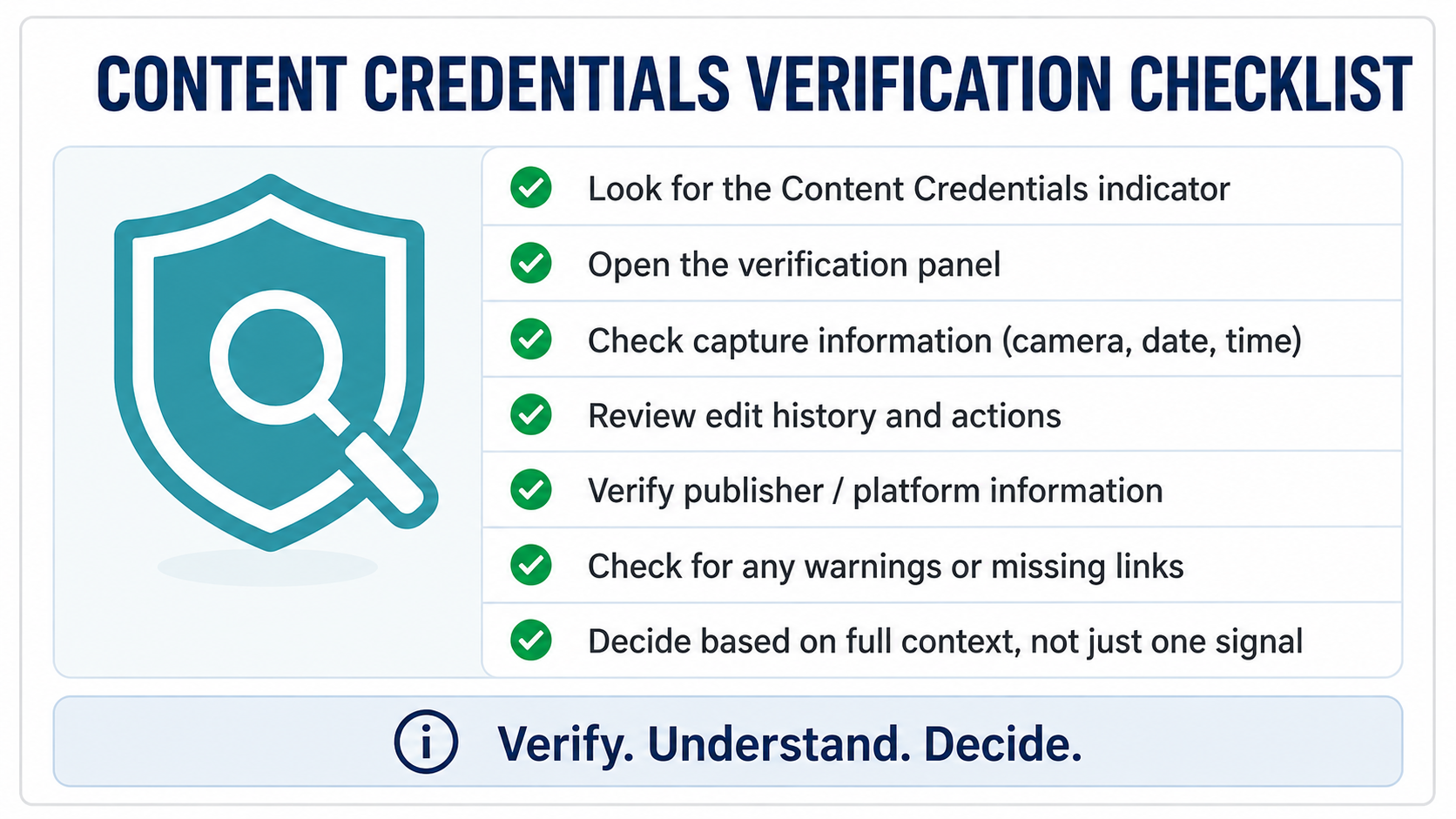
Do not stop at “credential present.” The useful question is what the credential actually says and who signed it.
Is C2PA the Future of Camera Authenticity?
It is too early to call C2PA a universal solution, but the direction is significant.
By 2026, the standard is no longer confined to prototypes. Camera makers are shipping or activating provenance features, platforms can display credential information, and the C2PA ecosystem now includes a formal conformance program and trust lists.
The more important shift is cultural: authenticity is becoming a camera specification.
For decades, buyers compared megapixels, autofocus points, dynamic range, stabilization and codecs. In an AI-heavy media environment, professional users may increasingly compare whether a camera can also create a verifiable capture record.
That does not make traditional photography obsolete. It may do the opposite: it gives real-world capture a new way to document its origin.
Final Takeaway
Content Credentials are not a magic stamp that says REAL.
They are a technical framework for recording and validating media provenance.
For photographers, the practical value is strongest when three conditions are met:
- the camera creates trustworthy signed provenance;
- the editing and publishing workflow preserves it;
- the person receiving the image knows how to interpret it.
If one of those pieces fails, the value drops.
If all three work together, C2PA can give photographers, editors, clients and audiences a stronger evidence trail about where an image came from and how it changed.
That makes Content Credentials worth understanding now—even if they are not yet a must-have feature for every photographer.
FAQs
What are Content Credentials in photography?
Content Credentials are cryptographically verifiable provenance information attached to a digital image or video using the C2PA standard. They can record information about the source of the file, trusted signers and compatible editing history so viewers can better understand how the media was created and changed.
Does C2PA prove a photo is real?
No. C2PA can provide evidence about a file’s provenance and signed history, but it does not automatically prove that the scene itself is truthful. A credentialed photo could still depict a staged scene, a screen, a print or misleading context. Google Photos explicitly notes that Content Credentials do not by themselves tell users whether a photo is real or fake.
Which cameras support Content Credentials?
Support is expanding and changes frequently. Officially verified examples as of August 2026 include Canon EOS R1 and EOS R5 Mark II, Nikon Z6III, several Leica models including M11-P and SL3-series bodies, and current Sony cameras such as the α7 V and α7R VI that advertise Sony’s Camera Authenticity Solution. Always confirm current firmware, licensing and regional availability before buying specifically for C2PA.
Are Content Credentials the same as EXIF metadata?
No. EXIF stores ordinary capture metadata such as camera settings, while C2PA adds a cryptographically signed provenance framework that compatible systems can validate and extend through editing. EXIF can still be useful, but it does not provide the same standardized trust chain.
Can editing remove Content Credentials?
Yes. An unsupported editor, export process or platform can strip or break the provenance chain. C2PA-compatible software can preserve the earlier history and append information about edits, but photographers should test their exact workflow before relying on credentials professionally.
Do Content Credentials work on YouTube?
YouTube can display a “Captured with a camera” disclosure for qualifying videos when compatible C2PA provenance survives the production and upload workflow. YouTube warns that unsupported tools can break the provenance chain, so the entire workflow matters.
Do I need Content Credentials as a normal photographer?
Not necessarily. For hobby, travel, family, landscape and general creative photography, core camera performance is usually more important. C2PA becomes more valuable for journalism, documentary, sensitive commercial work, institutional communications and any workflow where proving origin or edit history matters.
What happens if a photo has no Content Credentials?
Nothing can be concluded from that fact alone. Most legitimate images still do not carry C2PA provenance. A missing credential does not mean a file is fake; it means this particular form of provenance evidence is unavailable.
Bookmark this guide. Camera support, firmware requirements, licensing and platform behavior are changing quickly. Pixanded will keep this page updated as C2PA adoption expands.
Want the important updates without tracking every firmware release? Join the Pixanded newsletter for practical updates on camera authenticity and creator workflows.