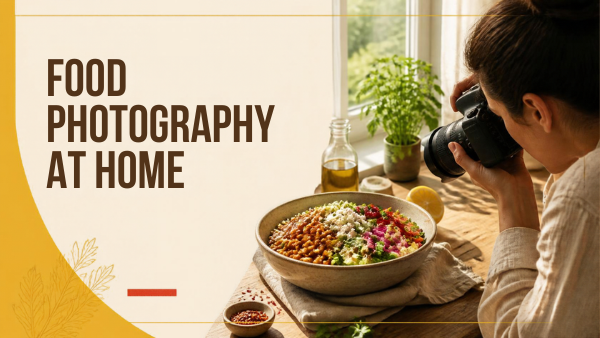
Food photography at home becomes easier when you make one change at a time. A fresh dish, a usable window and a stable camera are enough to run a useful comparison. Begin with the food’s shape and texture rather than an equipment shopping list.
This guide proposes a six-frame practice shoot: photograph the same dish from three viewpoints, first without a reflector and then with one. Your results will show which angle and shadow depth suit that particular dish. The exercise is a learning method.
Table of Contents
1. Choose a dish you can keep consistent
For a first test, choose food that stays presentable while you move the camera. A bowl of grains, fruit or roasted vegetables is easier to repeat than melting ice cream or a freshly poured fizzy drink. Assemble the camera position, surface and background before adding the finishing ingredients.
Write a one-sentence purpose: “Show the texture and ingredients of this bowl for a simple recipe page.” That gives you a way to decide what belongs in the photograph. A tall stack of pancakes might need its height shown; a patterned tart might benefit from seeing its surface.
Keep enough space around the subject to move safely. Choose props that help explain the meal and remove packaging or clutter that draws attention away from it. Start with one plate or bowl; you can add a utensil later if the picture needs context.
2. Find usable window light
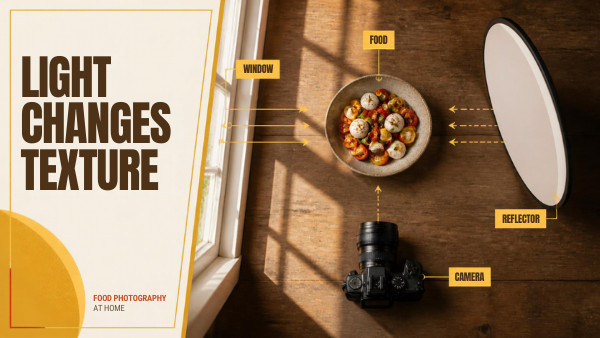
Begin beside a window with soft indirect light. If direct sun produces patches you do not want, move the table or test a suitable diffuser. Turn off nearby household lights if their color competes with the daylight.
Adobe’s food-photography guide discusses indirect window light, planning and simple styling. Treat the window as a direction you can work around: turn the dish or move the camera and observe how the shadows change.
Place a white card opposite the window to return some light into the darker side. If the subject has shiny packaging, our reflective product photography guide shows how white and black cards shape reflections. Move it nearer and farther before deciding whether to keep it. The aim is a shadow that describes the food without concealing important ingredients.
| Observation | First adjustment | Check in the new frame |
|---|---|---|
| Bright glare obscures the food | Change camera or dish position | Texture and highlights |
| The shadow hides ingredients | Test white-card bounce | Detail without unwanted flattening |
| Mixed yellow and blue color | Simplify the light sources | Food and neutral plate color |
| Window light changes during the test | Pause and repeat the affected frames | A fair comparison |
3. Choose the angle for the food
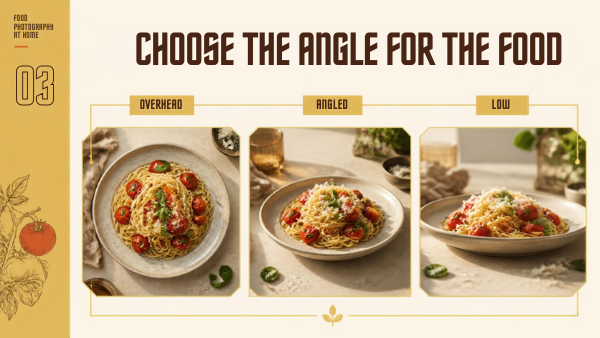
Overhead framing often makes flat arrangements and ingredient patterns easy to read. An angled view can show both the top and sides. A low viewpoint can emphasize height, but it may hide the rear ingredients or expose more background.
These are starting observations, not rules that assign every food to one angle. Make the three versions and compare the important shape. Keep the food arrangement the same so the camera viewpoint is the main change.
Leave room for the intended crop. A recipe-page photograph and a narrow social crop may need different compositions. If both matter, record a separate composition instead of hoping that every frame will crop equally well.
4. Focus on the detail that sells the dish
Select a visible feature: the front fruit, a cut edge, the surface texture or the most important ingredient. Check that the required detail is sharp in the actual photograph. A bright small screen can hide a focus problem.
Use an aperture that gives the useful depth of field for the view. Do not select the widest aperture simply because blurred backgrounds look attractive. If important ingredients are soft, increase the depth of field or change the angle.
Support the camera when a stationary scene needs a longer exposure. If hands enter the frame or food is being poured, test a shutter setting that renders that movement as intended. For the underlying tradeoff, use the aperture and shutter-speed exercises.
Choose settings by the problem you can see
Begin with the composition, then check focus, movement and brightness in that order. On a camera with aperture control, a middle aperture such as f/5.6 or f/8 can be a reasonable test for a bowl photographed at an angle. These are starting values, not a guarantee that the whole dish will be sharp: distance, focal length and the depth of the arrangement also matter. Make a frame and inspect the ingredient nearest the camera and the ingredient farthest away.
For a stationary dish, reliable support gives you room to lengthen the exposure instead of opening the aperture when you need more depth of field. Use a timer or remote trigger if pressing the shutter disturbs the camera. When photographing a hand pouring sauce, make the movement test separately; settings that work for an untouched plate may blur the hand.
On a phone, tap the ingredient that matters and use focus or exposure lock if your camera app supports it. Watch what happens when you recompose: the app may otherwise change the rendering between frames. Avoid moving closer than the phone can focus. If a camera switches lenses automatically, check whether that change affects the viewpoint or texture comparison.
Before the six-frame exercise, photograph a neutral plate or card in the same light. Use it as a color reference during editing, then compare the actual food. A neutral reference can help identify an unwanted cast; it does not prove that every ingredient should have the same color or brightness.
5. Make the six-frame comparison
Keep the dish, window and editing approach stable. Make overhead, angled and low frames without a reflector. Add the white card and repeat the same three viewpoints. Review each capture before dismantling the setup.
Do not force identical exposure settings if doing so makes one view unusable. Record any necessary adjustment; an unrecorded exposure change could be mistaken for an improvement caused by the reflector.
| Frame | View | Reflector | What to record |
|---|---|---|---|
| 1 | Overhead | None | Ingredients, spacing, exposure |
| 2 | Angled | None | Shape, texture, background |
| 3 | Low | None | Height, focus, hidden ingredients |
| 4 | Overhead | White card | Shadow change versus frame 1 |
| 5 | Angled | White card | Texture versus frame 2 |
| 6 | Low | White card | Shape and shadow versus frame 3 |
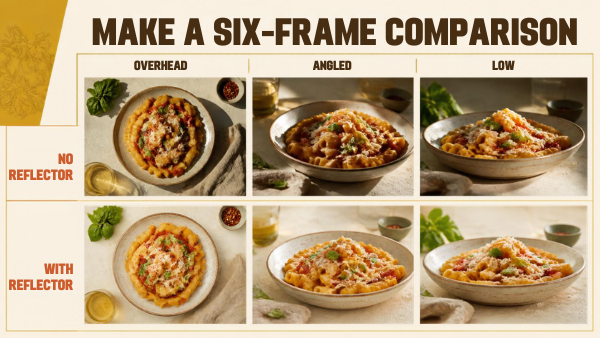
Choose the strongest frame for the purpose you wrote at the start. Describe the reason in concrete terms: “The angled view shows the cut edge, and the card reveals the darker fruit.” That note will help you repeat the setup more than “this one looks professional.”
6. Style and edit without losing the food
Make small changes after the comparison: straighten the plate, remove a distracting crumb or add a relevant utensil. Photograph each change so you can return to the simpler arrangement if the new props compete with the dish.
Keep the food looking like the food being presented. Correct an unwanted color cast and inspect contrast and texture. Excessive saturation can make ingredients look implausible; heavy smoothing can remove the surface detail you worked to capture.
Follow a repeatable photo-editing workflow and inspect both the full photograph and important details. Keep the original files and export for the actual destination.
7. Review the final crop
Open the exported file on the device or page where it will appear. Check that the important ingredients remain visible, the crop does not cut an essential part of the dish and any nearby text has enough room.
Record the window direction, approximate camera position, reflector position and chosen crop. The next time you photograph a similar dish, begin there and adjust for the actual food and available light.
For general tabletop organization, read the product-photography workflow at home. This food exercise adds decisions about freshness, edible styling and the viewpoint that explains a dish.
8. Troubleshoot the frame before buying more equipment
If the near ingredient is sharp but the back of the bowl is not, begin with depth of field and camera angle. A slightly higher viewpoint may bring the important ingredients into a more manageable depth range. Try that before buying a different lens. If nothing looks sharp, check focus, camera movement and the original file separately.
If white crockery loses its shape, inspect the highlights and change the exposure or light direction. If a shiny sauce reflects a bright rectangle, move the camera or rotate the plate a little and compare the result. A reflector affects shadows; it does not automatically remove a reflection coming from the window.
If the food looks flat, first compare the version without bounce. You may have filled the shadows so thoroughly that the texture is harder to read. Move the white card farther away or remove it. Keep a small amount of shadow where it explains the shape.
Finish with a repeatable setup note. For example: “Window on the left; camera at an angled view; white card on the right with enough space to keep a visible shadow; focus on the cut edge; compose separately for the recipe page and the tall social crop.” This is a sample note, not a tested Pixanded setup. Replace it with your own positions and observation.
Keep the six originals and the selected export together. On the next shoot, compare your new result with the previous choice at the same viewing size. That makes progress easier to assess than remembering whether the photograph looked good on the camera screen.
FAQs
Do I need a macro lens for food photography?
No. Begin with the framing and working distance your camera can provide. A close-up requirement may call for different equipment, but it is not necessary for every plate.
Is overhead always the best angle?
No. Overhead can explain patterns and ingredients; an angled or low view may explain height and structure better. Compare views of the actual dish.
Should I always use a reflector?
No. Use it when the returned light improves the detail or mood you want. Keep the version without it as a comparison.
Can I use my phone?
Yes. Stabilize it, control the light and inspect the recorded photograph. Avoid assuming that a pleasing live preview guarantees a good final file.
How do I know when the photograph is finished?
Compare it with your original purpose and intended crop. If the food is understandable, the useful texture is clear and distractions are controlled, additional props may not improve it.
Lighting and focus depend on your actual room, camera and dish. Repeat the comparison when those conditions change.