
Focal length helps determine how much of a scene a lens includes. Working distance determines where you stand. Treating these as separate choices makes it easier to frame a person, a product or an interior without discovering that you cannot fit the camera in the room.
You do not need a new lens to learn the relationship. A zoom, or two available lenses, is enough for the two-pass exercise below.
Table of Contents
1. What the millimeters describe
Focal length is an optical characteristic, usually stated in millimeters. It is not the length of the lens barrel or the distance from camera to subject. Nikon’s focal-length guide explains the connection between focal length, angle of view and magnification.
On the same camera, a shorter focal length generally includes a wider view. A longer focal length includes a narrower view. A prime has a fixed focal length; a zoom provides a range.
The sensor also matters. Two cameras using the same focal length can include different amounts of the scene when their sensor sizes differ. Always identify the camera format when comparing someone’s example with your own setup.
2. Framing and perspective are different
Framing describes what fits inside the image. Perspective describes the apparent relationships between objects at different distances.
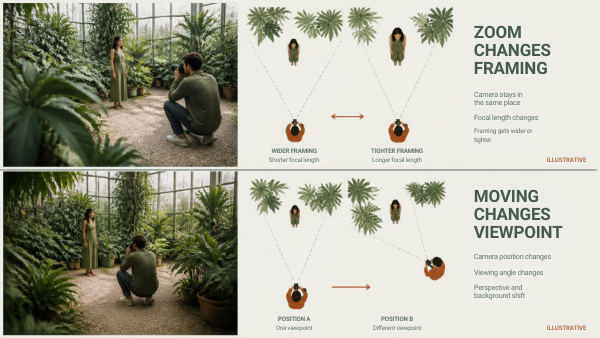
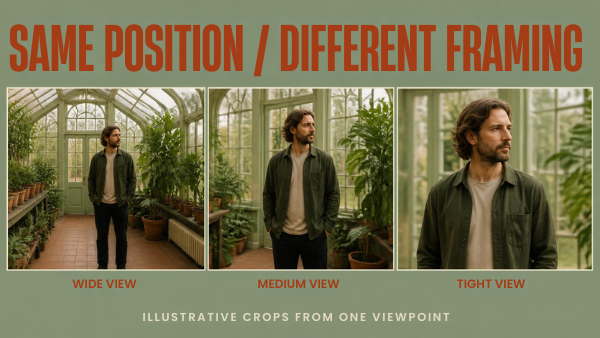
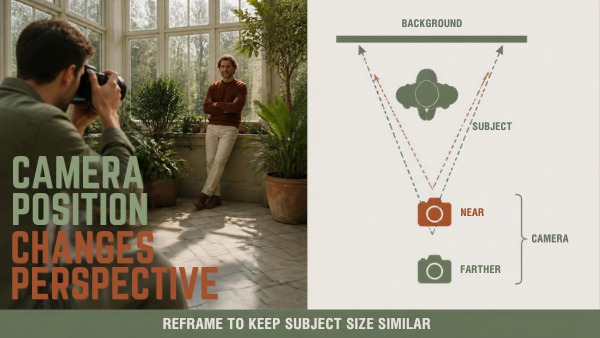
Changing focal length while keeping the camera in the same position changes the framing. Moving the camera changes the viewpoint and therefore perspective. In practice, photographers often do both together: they select a longer lens and step back to restore the subject’s size. The distance change is central to the resulting perspective.
Imagine a person standing several steps in front of a wall. From a close camera position, their nearest features may look prominent relative to the wall. From farther away, that relationship looks different. A longer focal length can help frame the person from farther away, but it does not move the camera for you.
3. Use equivalent focal length as a comparison
Approximate full-frame-equivalent focal length is:
Actual focal length × crop factor = equivalent focal length for comparing angle of view
For example, an 18 mm lens on a camera with a 1.5× crop factor gives an angle-of-view comparison of approximately 27 mm on full frame. A 50 mm lens on that camera corresponds to approximately 75 mm.
The lens remains an 18 mm or 50 mm lens. This calculation does not change its physical focal length or automatically make every image characteristic identical. Video crop modes, stabilization crops and aspect ratios can also alter the recorded framing. Check the active recording mode before planning a tight room.
| Question | Information to record | Why it matters |
|---|---|---|
| What camera format am I using? | Sensor format and any active crop | Focal-length numbers alone are insufficient |
| What must fit in the frame? | Subject, hands, props and surrounding context | Defines the required framing |
| Where can the camera stand? | Available distance and access | Determines usable viewpoints |
| What is behind the subject? | Background distance and objects | Affects apparent relationships and composition |
| Will the subject move? | Likely movement and framing allowance | Avoids cutting off important action |
4. Choose the viewpoint before forcing the frame
Walk around without photographing. Find a position that gives the subject and background a useful relationship. Then select a focal length that includes what you need from that position.
If your available lens cannot achieve the frame, decide which compromise is acceptable: a different viewpoint, a looser composition, a different subject arrangement or another lens. Avoid moving extremely close merely because a wide view makes everything fit.
For a seated interview, include enough room for natural gestures and check the visible background. For a small product, watch the relative sizes of its front and back surfaces. For a room, inspect objects close to the edges and whether the camera position describes the space honestly.
These are composition decisions, not universal focal-length rules. A wide view can be intentional; a narrow view can be unhelpful when it removes essential context.
5. Pass one: keep the camera position fixed
Choose a stationary adult subject or a chair with an object placed on it. Include a background with recognizable details. Mark the camera position and keep its height and direction consistent.
Make three photographs at short, middle and long settings available on your lens. Do not step forward or backward. Record the actual focal lengths and camera mode.
Compare how much of the subject and background appears. To compare a shared area more closely, crop a wider frame to a similar view, while remembering that cropping changes resolution. Differences from lens rendering or distortion may remain; this exercise isolates the viewpoint rather than proving every lens produces identical pixels.
6. Pass two: keep the subject framing similar
Now make three photographs in which the subject occupies roughly the same part of the frame. Use each focal length again, moving the camera as needed. Record the camera-to-subject distance approximately.
Inspect the relationship between the subject and background. Also inspect nearby features and objects. You have changed the viewpoint, so expect a different result even when the person appears similarly sized.
| Pass | Keep consistent | Change | Compare |
|---|---|---|---|
| Fixed position | Camera location, height and direction | Focal length | Amount of scene included |
| Similar subject size | Approximate subject framing | Focal length and camera distance | Perspective and background relationship |
| Practical selection | Required subject and context | Choose your preferred workable setup | Access, comfort and framing margin |
This is a repeatable practice plan. The article does not claim that Pixanded performed a measured comparison of specific lenses.
7. Troubleshoot before buying
| Problem | Check first | Possible adjustment |
|---|---|---|
| Cannot fit the subject in a small room | Available camera position and active crop | Change arrangement or use a wider view |
| Nearby features look too prominent | Camera is very close | Move back, then reframe appropriately |
| Background distracts | Viewpoint and background contents | Change position or simplify the scene |
| Hands leave the video frame | Framing was too tight | Allow room for actual gestures |
| Online lens example looks different | Sensor, crop, viewpoint and subject distance | Compare the complete setup, not just millimeters |
A shopping decision should follow the limitation you can name. “I need more working distance while keeping this framing” is more useful than “this focal length looks professional.”
For related practice, see Composition practice and Choosing portrait lenses by space and format.
FAQs
Does a longer lens change perspective by itself?
Changing the camera position changes perspective. A longer lens often accompanies a more distant position, which is why the two changes are easily confused.
Does a crop-sensor camera turn my 50 mm lens into a different lens?
No. The physical focal length stays the same. Equivalent focal length helps compare the angle of view across formats.
Is one focal length always best for portraits?
No. Subject framing, camera distance, location and intended appearance all matter. Test the viewpoint you can use before choosing a number.
Should I zoom or move my feet?
Choose deliberately. Zooming changes framing from the current viewpoint; moving changes the viewpoint. Neither operation replaces the other in every situation.
Why is my video tighter than my photograph?
The active video mode may use a crop or a different aspect ratio. Check recording-mode and stabilization settings in your camera documentation.
Focal length is a useful description of a lens, but a finished composition also depends on the camera format, position and scene. Record those together when repeating a successful setup.