
Photography composition rules are tools for deciding what belongs in the frame and how its parts relate. Start with the subject, then inspect its position, background and edges. A thirds grid can suggest an alternative, but a centered photograph can be the stronger choice.
The useful question is not “How many rules did I follow?” It is “Does this arrangement communicate what I intended?” This guide gives you a six-frame exercise and a review method you can repeat with a camera or phone.
Table of Contents
1. Decide what the photograph is about
Name the subject before selecting a technique. It might be an adult sitting on a park bench, the shape of the bench, or the relationship between that bench and an empty walkway. These are different photographs even if the location stays the same.
Write one short sentence: “I want the viewer to notice the solitary bench and the space around it.” That intention gives you a reason to retain some surroundings and exclude others.
Now inspect the frame. Is a bright sign stronger than the subject? Does a tree trunk appear to grow out of someone’s head? Is a foreground railing hiding an important detail? Composition includes these relationships, not just the location of one object.
Do not strip away every background detail. A contextual object may explain the story. Keep it when it supports the intention, and change the frame when it competes without adding meaning.
2. Compare thirds with the center
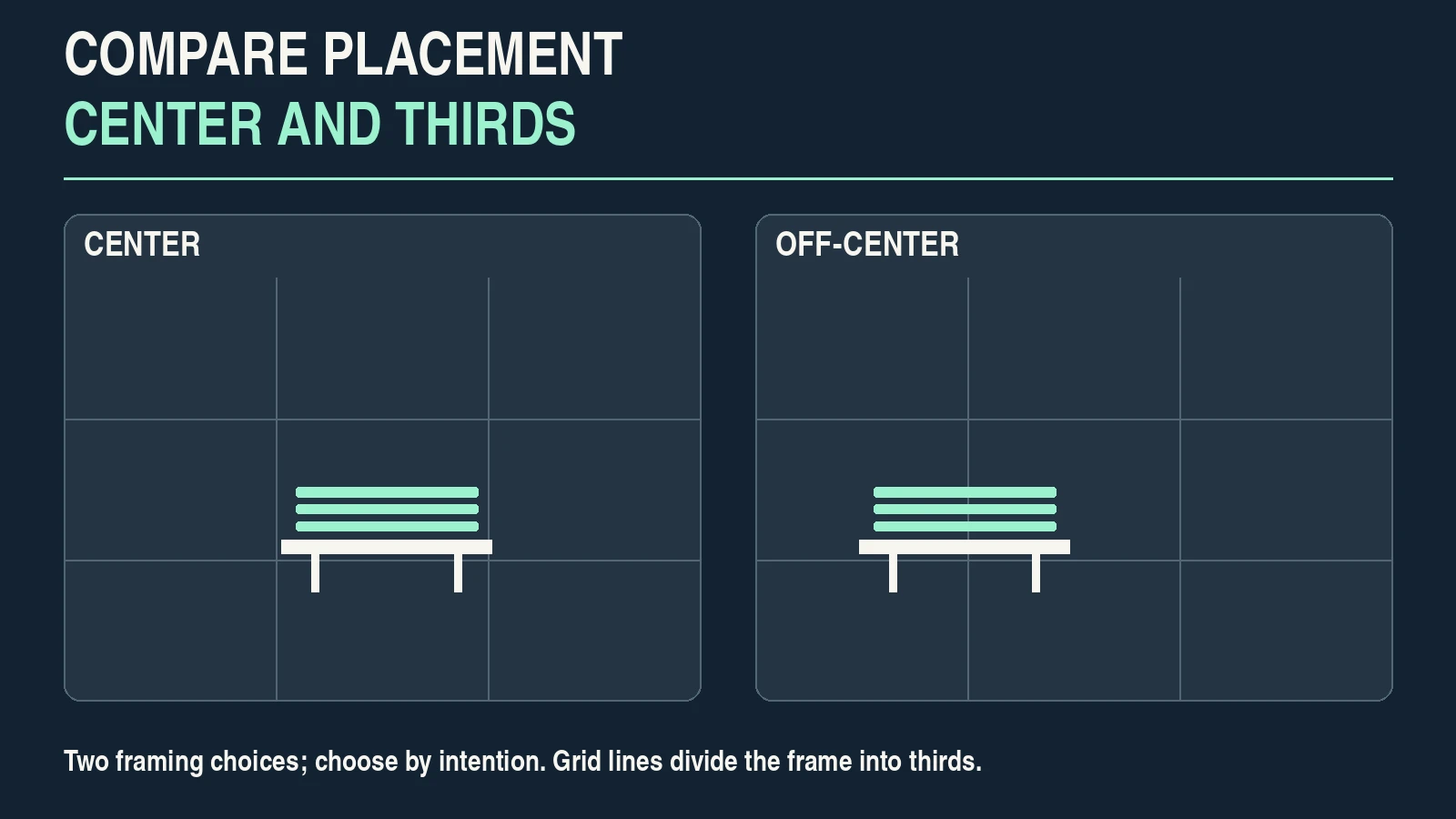
A rule-of-thirds grid uses two vertical and two horizontal lines, dividing the frame into nine equal rectangles. Try putting an important feature near a line or intersection, then compare it with a centered version.
For a bench photograph, placing the bench toward one side may reveal more walkway on the other. Centering it may emphasize its shape or a balanced architectural setting. The grid does not decide which result serves your intention.
Nikon’s composition guidelines explain the thirds grid as a starting point. Its separate center-composition discussion shows why placing a subject in the middle can work thoughtfully.
For a landscape, moving the horizon higher or lower changes the emphasis between sky and land. A central horizon can support a reflection or deliberately balanced arrangement. Keep it level when that is your intention; an accidental tilt is a separate issue from where the horizon sits.
If your camera offers a grid, its location varies by model. Check the display instructions. Turn it off for one comparison if it distracts you from noticing the actual subject.
3. Check where a line leads
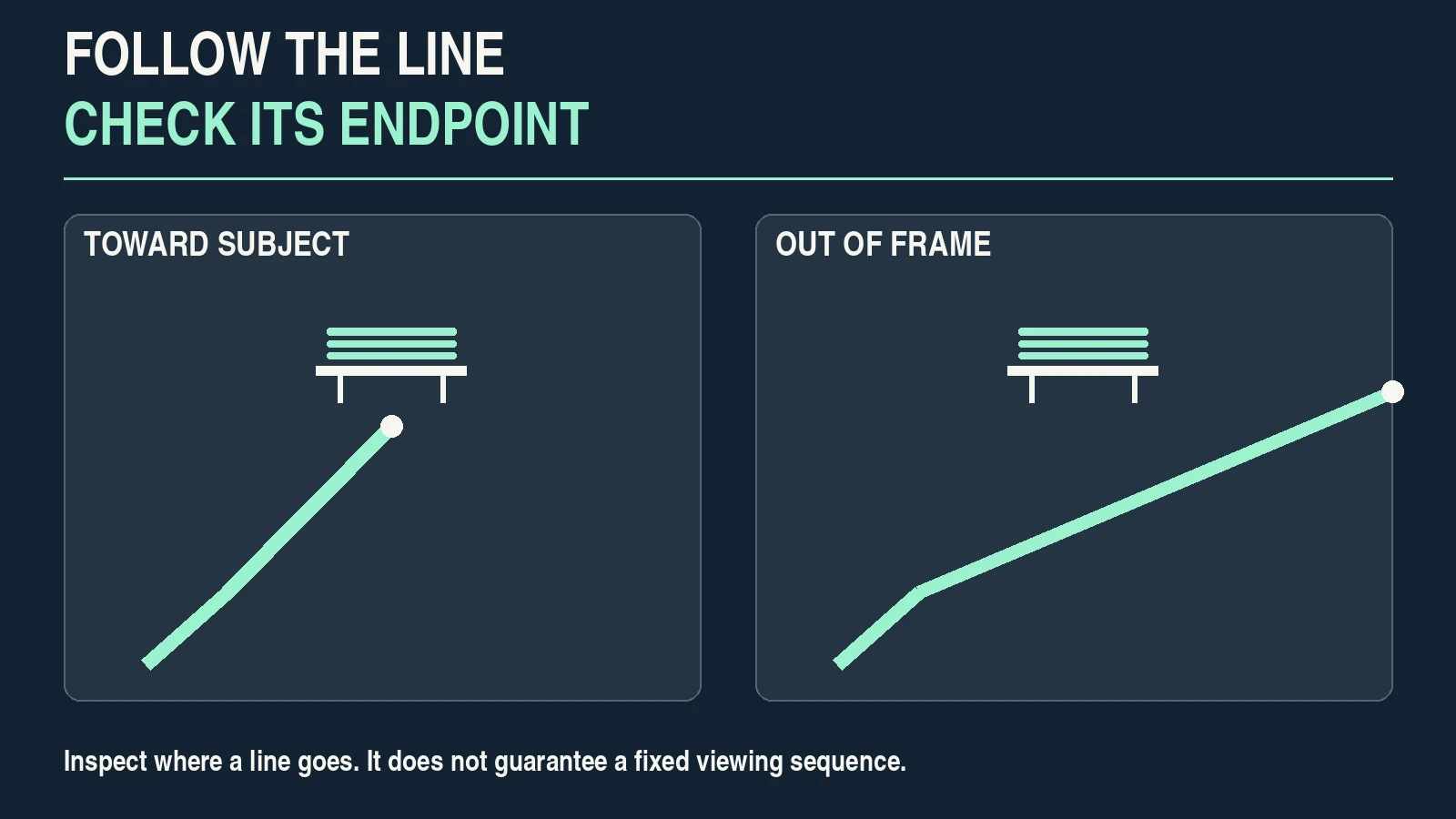
A path, railing, shadow or curve can connect parts of the frame. Follow it visually: does it approach the subject, end in a distracting object, or leave the frame?
For the bench exercise, compare a view with the path entering from a corner against a view where the path is barely visible. Include the line only if it contributes to the photograph.
Adobe’s leading-lines guidance discusses finding and using lines in a scene. Treat this as a visual choice, not a guarantee that every viewer will look in exactly the same sequence.
A line can be the subject itself. A winding path photographed without a person may be enough. There is no requirement to place a separate object at its endpoint.
Use accessible paths and permitted viewpoints. A rail track or traffic lane is not a suitable practice location just because it makes a strong line.
4. Move to separate the subject from the background
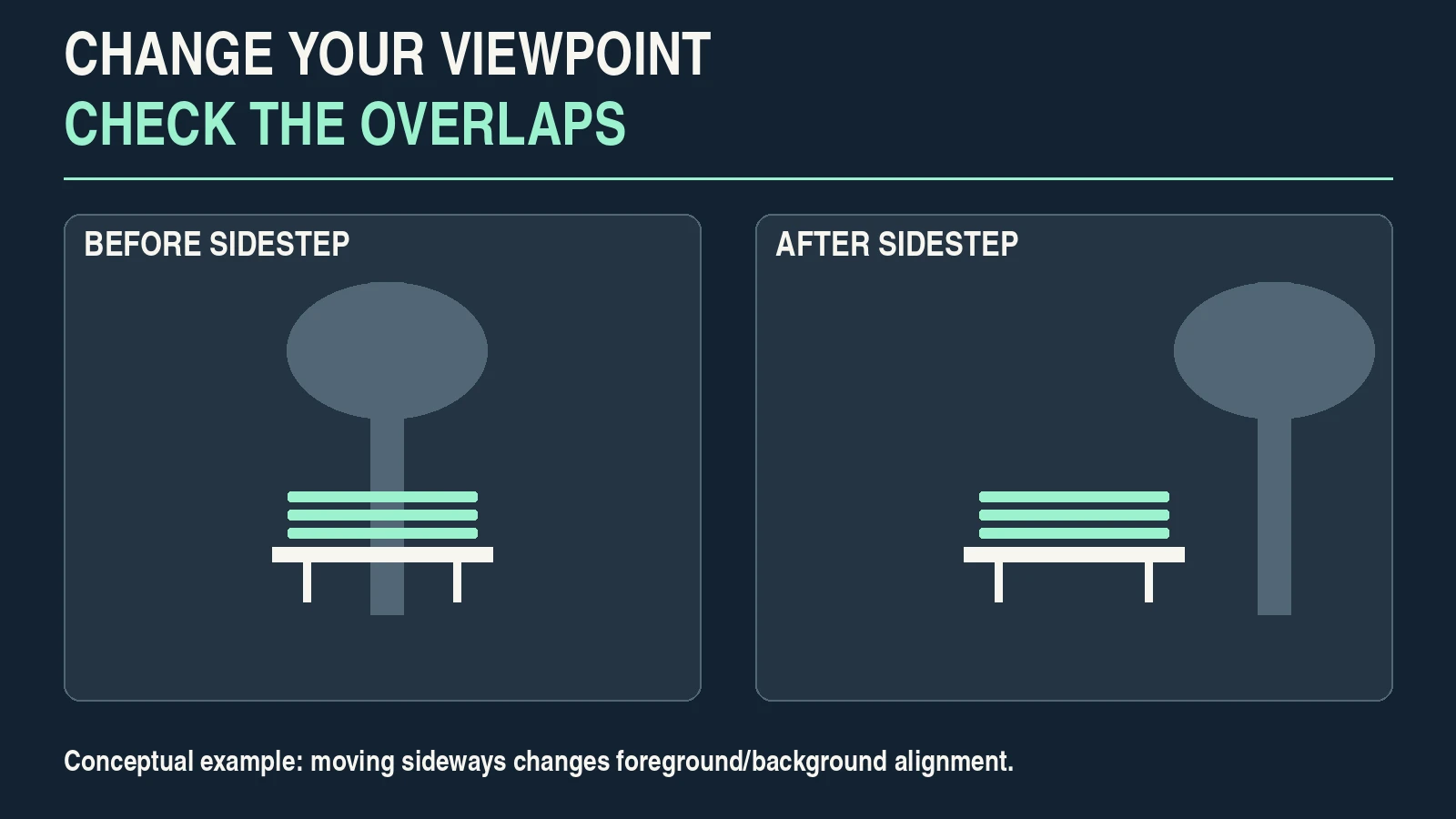
Changing camera position changes how foreground and background objects line up. A small step sideways may move a distracting pole away from a subject’s outline. A higher or lower viewpoint may replace a cluttered background with a quieter one.
Moving and zooming solve different problems. A zoom changes framing from the same position; moving changes your viewpoint. You can use both, but inspect their effects separately.
With the bench, keep a similar subject size for a pair of frames taken from different positions if you can. Notice whether the background relationships changed. Do not assume that a tighter crop is equivalent to a different viewpoint.
Check focus again after moving or reframing. If the subject is a person who may move, use an appropriate autofocus approach instead of relying on a focus lock made earlier.
Depth of field can reduce background detail, but blur is not the only way to simplify a frame. An out-of-focus bright patch can still distract. The aperture and shutter-speed exercises help you separate exposure and motion choices from placement.
5. Use space and layers for a reason
Negative space is an area with relatively little competing detail around the subject. It can communicate isolation, scale or room for movement. It is not automatically “wasted space,” and it need not be perfectly blank.
Layers place relevant material in foreground, middle distance and background. A nearby branch, the bench and a distant path may establish a relationship between distances. A branch that blocks the bench without adding anything may simply be an obstruction.
Framing within the frame uses a doorway, arch or similar element around the subject. Check that the foreground frame supports the subject rather than becoming the brightest or most dominant feature.
Filling the frame emphasizes a detail by giving it more area. A close photograph of worn bench slats tells a different story from the bench in its park setting.
Choose one main change at a time:
| Intention | Option to compare | What to inspect |
|---|---|---|
| Show a subject in its surroundings | Wide framing with context | Does the context explain the subject or overwhelm it? |
| Emphasize shape or balance | Centered arrangement | Are surrounding elements helping the balance? |
| Connect parts of the scene | Visible line or curve | Where does the line actually end? |
| Show space around a subject | Quieter surrounding area | Does the retained space support the intention? |
| Emphasize a surface or detail | Tighter framing | Is important context lost? |
These are choices to test, not fixed genre rules. Portraits do not require thirds, and landscapes do not require a foreground rock.
6. Inspect all four edges
Before the shutter, trace the top, right, bottom and left edges. Look for accidental partial objects, clipped important features and small bright distractions.
With a person, check whether the crop looks deliberate and whether enough of the gesture remains understandable. There is no universal prohibition against every body crop; the practical issue is whether this particular cut supports the picture.
Check overlaps near the main outline, too. A frame can have clean outer edges while a distracting background object intersects the subject.
Leave room for a known delivery crop. A landscape original may need a vertical social version, while a website card may trim top and bottom. Compose for the intended result without assuming one arrangement survives every format.
Cropping later is a valid tool. It can adjust the border and remove excess area, but cannot recreate a different camera position or retrieve information outside the original frame. Keep the uncropped source.
7. Make six frames of one still subject
Choose a permitted, quiet park bench or another stationary object. Avoid strangers and private details. Stay in a safe area; there is no need to move objects that do not belong to you.
Use one camera or phone. Keep the light reasonably consistent and choose exposure and focus that make the subject usable. Do not introduce a different color treatment for each frame; that makes placement harder to compare.
Make this sequence:
| Frame | Change to try | Question for review |
|---|---|---|
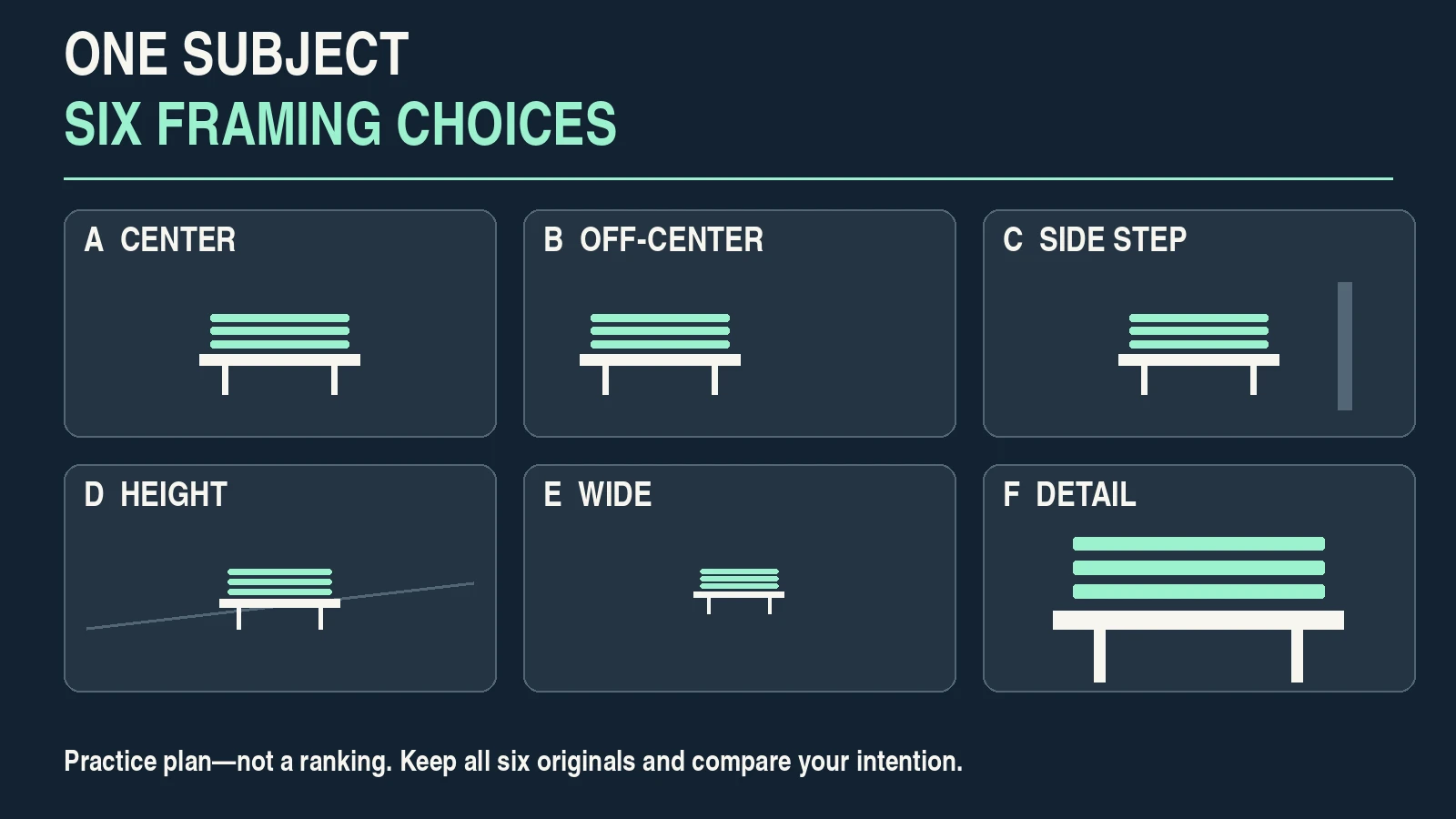
| A — Center | Put the subject near the center | Does the arrangement support its shape or balance? |
| B — Off-center | Place the subject near a thirds line | Does the extra space have a useful role? |
| C — Side step | Move sideways and reframe | Which overlaps or background objects changed? |
| D — Height | Try a lower or higher viewpoint | Is the background relationship clearer? |
| E — Wide | Include surroundings intentionally | What context did you gain? |
| F — Detail | Make a closer or tighter composition | What information did you exclude? |
If the subject or light changes, note it. These frames isolate framing choices as far as practical; they are not a laboratory test.
On a phone, changing between lenses may alter processing as well as framing. For an initial comparison, use the same lens where practical and move safely. Do not use a wide camera too close to a face without considering how the viewpoint affects proportions.
Keep all six originals. The goal is to identify the effect of each decision, not to produce six equally strong final photographs.
8. Review without scoring the rules
View the images at the same size. First look without a grid overlay. Choose two candidates, then explain the difference in ordinary language.
Ask:
- What attracts attention first?
- Which object is the intended subject?
- What does the background contribute?
- Is an edge or overlap distracting?
- What changed when the camera position changed?
- Which version fits the final crop and the intended use?
A useful note is specific: “In C, the sideways step separated the tree trunk from the bench. In E, the path explains the setting, but the bright sign draws too much attention.” This is a hypothetical observation, not a result from an actual Pixanded sequence.
| Possible observation | Next change to test | Reason |
|---|---|---|
| Subject overlaps a pole | Step sideways and reframe | Change the relationship before applying blur |
| Wide frame explains the setting but includes a bright sign | Try another angle or permitted crop | Keep context while reducing competition |
| Centered arrangement feels clear and deliberate | Retain it for comparison | Do not discard it solely because it breaks thirds |
| Close frame shows texture but loses the location | Choose based on the intended story | Detail and context serve different purposes |
You can ask another person what they notice first, but their answer is feedback rather than a universal quality score. If two viewers read a photograph differently, reconsider your intention and the delivery context.
Do not choose a photograph only because it follows more named rules. A clear frame using one decision can be more useful than a crowded frame trying to demonstrate several.

9. Repeat with a new intention
Return to the same subject with a different brief: first “show its setting,” then “show its texture.” Make fewer frames once you know which changes matter.
For a consenting adult portrait, compare subject placement and background separation while keeping the expression and light as consistent as possible. For a product, check whether the frame explains shape, scale or use. Composition choices depend on the purpose.
If a subject is lost in bright or dark areas, a dynamic-range capture check can help you assess which details the camera records. Better placement cannot fix every exposure, focus or motion issue.
Keep a short practice record: subject, intention, camera-position change, selected frame and reason. Over time, this builds a vocabulary of actual decisions you can repeat rather than a checklist of mandatory shapes.
Frequently asked questions
What are photography composition rules?
They are guidelines for arranging subjects, space and other elements inside a frame. Use them to test alternatives; they do not guarantee that an image communicates well.
Must the subject be on a rule-of-thirds intersection?
No. A nearby line or intersection is one option. Compare it with the center and other placements, then choose what supports your intention.
Is centered composition a mistake?
No. It can emphasize shape, symmetry or a direct relationship with the viewer. Inspect the surrounding elements rather than rejecting the center automatically.
Should I move or zoom to improve composition?
Either may help. Moving changes the viewpoint and object relationships; zooming changes framing from the current position. Compare their effects instead of treating them as interchangeable.
Can I improve composition with a phone?
Yes. Subject choice, camera position, edge checks and comparison work with a phone. Be aware that switching lenses can also change processing and the viewing relationship.
Can cropping fix every composition problem?
No. Cropping changes the border and removes material, but cannot supply a different viewpoint or recover a scene outside the captured frame. Retain the original file and inspect delivery crops.
Editorial note: The exercise offers a way to compare framing decisions. Its illustrations are conceptual examples; no guaranteed improvement, universal rule ranking or measured viewer response is claimed.