On this page
The new YouTube AI editing tools could make the first rough cut less intimidating. They will still need a clear idea, usable footage and someone who can decide whether the story makes sense. For a beginner creator, the most useful opportunity is to turn a pile of clips into a draft you can evaluate and improve.
This guide separates the September 2026 announcements from a practical editing workflow. The sample prompts and exercises are editorial suggestions, not evidence that we tested the new assistant or measured a performance improvement. You can use the same review method with a conventional editor if the new tools have not reached your account.
What YouTube announced—and what is coming later
At Made on YouTube on 23 September 2026, YouTube announced conversational editing across Shorts and YouTube Create. Creators can request a first draft, refine it through conversation and return to manual editing. The announcement describes help with tasks such as removing pauses and changing the order of clips.
The more detailed creator tools article adds Studio feedback on drafts and channel-matched thumbnail generation. Crucially, it describes testing up to three video cuts as coming soon. That wording is more cautious than the overview, so this guide does not treat video-cut testing as universally available on 6 October 2026.
Check your app, channel and region before depending on a feature. A public announcement does not establish that a particular control is available to your account. Video-cut experiments are also different from choosing between thumbnail or title options.
Build a clear brief before asking for a cut
AI cannot resolve an unclear promise by trimming clips faster. Before editing, write one sentence that names the viewer, the problem and the result. For example: “Help a first-time cook understand how to keep vegetables from burning in a small pan.” That sentence tells you which footage earns a place in the video.
Next identify the evidence the viewer needs. In the cooking example, you might need the pan temperature, the amount of food, the moment you stir and the finished texture. A beautifully framed ingredient shot is useful only if it supports the explanation or gives the viewer a necessary pause.
Finally, decide what must remain in sequence. Tutorials often have a real order: prepare, demonstrate, check the result. Reordering the footage for energy can accidentally imply that a later action happened earlier. Write those constraints into your brief before asking for pacing changes.
For a talking-head explanation, mark the sentence that answers the main question and the example that proves it. For a product video, identify the actual use demonstration. For a travel film, decide whether the structure follows a journey, a place or a personal experience. The format should follow the idea.
Organize footage so the story is visible
Review your clips before importing everything into an automatic workflow. Remove unusable takes from the working selection while preserving your originals. Listen for noisy audio, check that demonstrations are visible and identify clips that need a spoken explanation.
Use a small paper or text log: clip name, what it shows, best moment and any restriction. A restriction might be “do not use the opening because the microphone was not connected” or “this close-up shows the wrong product color.” These notes matter more than a clever prompt.
Choose five or six clips for the first exercise. A huge library makes it harder to diagnose why a draft went wrong. A limited selection lets you assess whether the assistant understood the role of each shot and whether manual adjustments are still efficient.
If recording problems keep making editing difficult, fix the capture process first. Our guide to recording clear interview audio covers a foundation that no pacing assistant can supply after the fact.
Ask for a rough cut with specific constraints
Treat your first prompt as an editing brief. State the purpose, approximate duration and order that must remain intact. Avoid “make this viral”: it does not explain what should change or what you will consider a successful result.
A possible cooking brief is: “Create a short first draft that shows the finished dish, then explains the pan setup and demonstrates the cooking sequence. Preserve the order of the actual cooking steps. Remove obvious dead time, keep the safety instruction and leave enough time to see the final texture.” Adjust the request to the controls your app actually provides.
A possible interview brief is: “Build the draft around the speaker’s answer about their first paid project. Preserve their meaning and natural speaking rhythm. Remove the unrelated setup conversation, but keep the explanation of what went wrong and how they fixed it.” This gives you a meaningful standard for reviewing the edit.
Use approximate length as a constraint rather than an absolute measure of quality. A clear demonstration may need a few extra seconds; a repetitive introduction may need fewer. If a cut meets your time target by removing essential information, revise the brief.
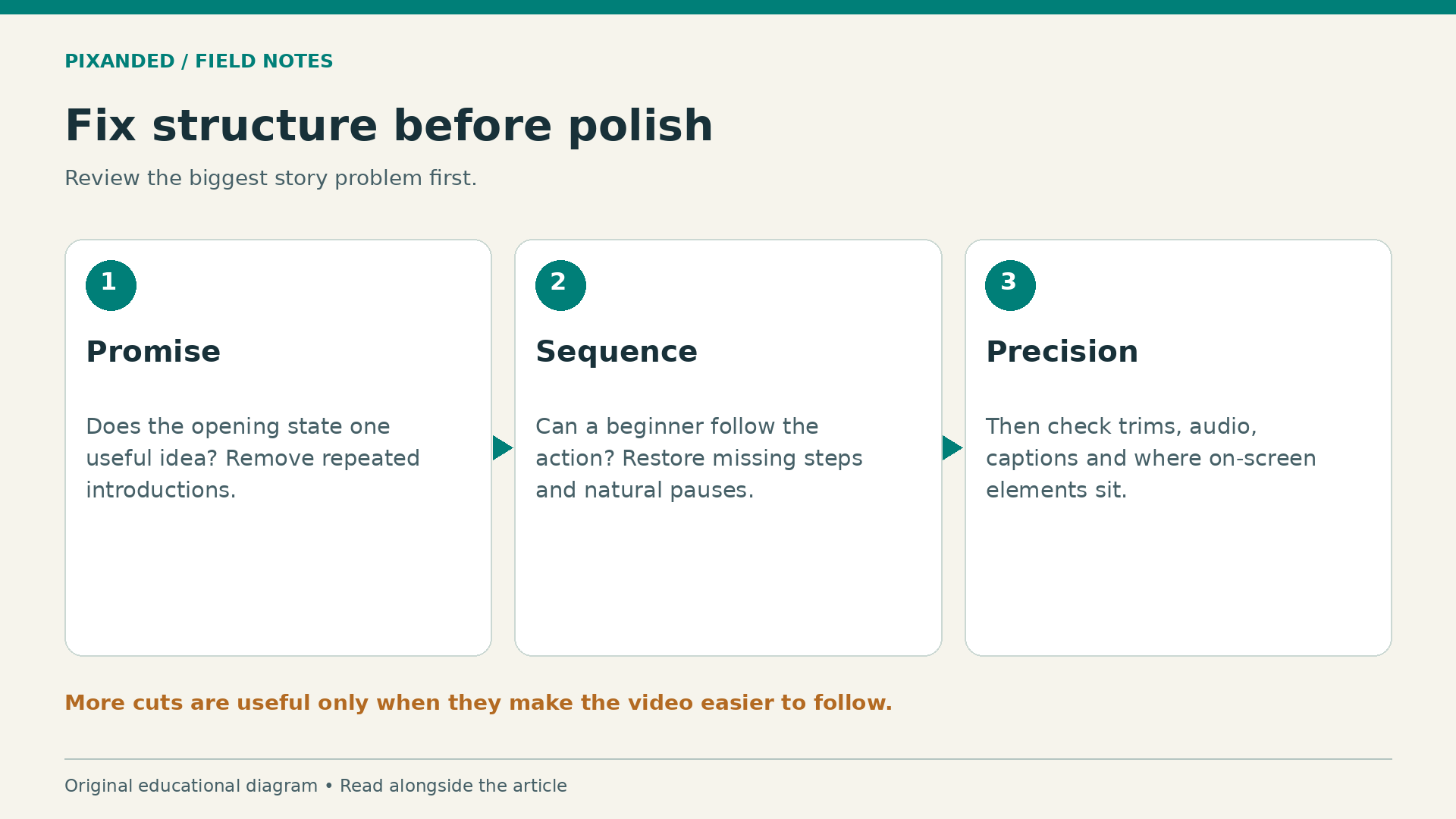
When the first draft is ready, do one complete viewing before making detailed changes. Write the two biggest problems. Perhaps the opening promises a result the video never shows, or the explanation jumps over a necessary step. Fix those before polishing individual transitions.
Use conversation for one change at a time
The most useful follow-up request describes an observable problem. “The opening repeats the same point twice; keep the stronger sentence and move the demonstration earlier” is actionable. “Make it more engaging” leaves the assistant to invent your preferences.
Preserve a version before major revisions if your workflow allows it. If a new draft becomes worse, you need an easy way to recover the previous structure. Keep a short change log outside the app when version controls are unclear.
Separate structural changes from cosmetic changes. First decide the order and meaning of the material. Then refine pauses, audio levels, captions and presentation. Changing all these at once makes it hard to know whether the story improved or merely became busier.
Return to manual editing for precise decisions. A cut at the wrong syllable, a caption covering a hand movement or a reaction shot placed too early needs a specific correction. Learning to move and trim clips remains valuable because you can judge and fix the assistant’s decisions.
Review pacing without erasing personality
A pause can be a mistake, a breath or the moment a viewer understands an idea. Removing every gap may make a beginner’s video sound rushed. Watch the sequence as a viewer unfamiliar with the topic. Can you absorb the instruction before the next action starts?
Listen with your eyes closed. Does the speaker still sound natural? Did the edit remove a qualification that changed the meaning? Are the music and sound effects competing with the explanation? Then watch without sound to see whether the visuals show a coherent sequence.
Check the beginning and end of every important action. If a hand appears to place an object before you have seen where it came from, the viewer may lose orientation. A short establishing shot can solve that problem more effectively than another fast transition.
Use the following table when a draft feels wrong. It links each symptom to a testable correction.
| What you notice | Likely editing issue | Try this correction |
|---|---|---|
| The first ten seconds feel repetitive | Multiple introductions | Keep one promise and show its evidence sooner |
| The tutorial is hard to follow | Missing step or unclear order | Restore the necessary action and its explanation |
| Speech feels breathless | Too many pauses removed | Restore natural breaths and comprehension time |
| The video looks active but says little | Decorative clips outweigh useful material | Replace one decorative shot with a demonstration |
| The ending feels abrupt | The result was never confirmed | Show or state the outcome before the closing line |
Run a small editing exercise
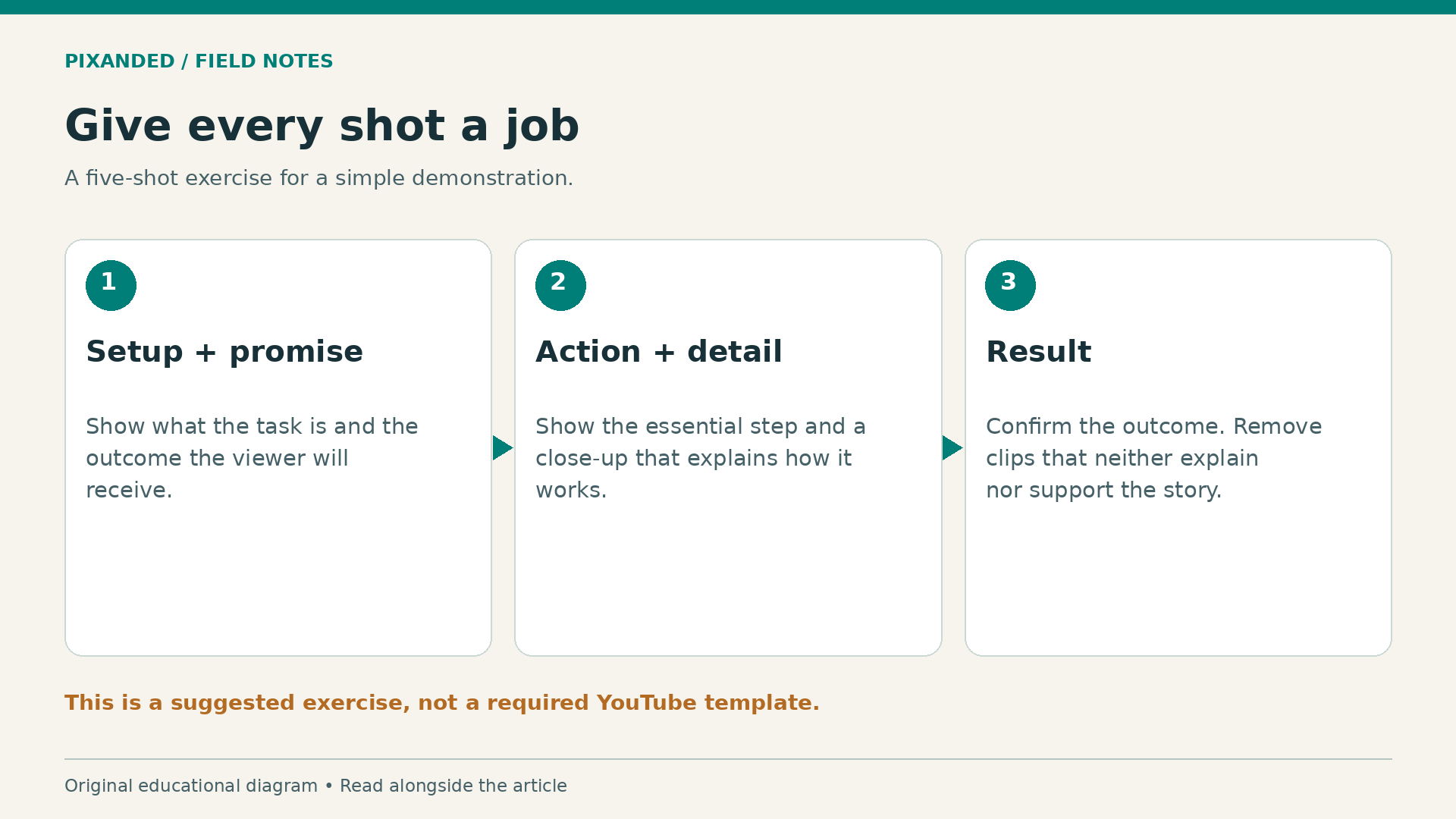
Film a simple task with a visible outcome: arrange a desk light, pack a camera bag or prepare a snack. Capture a wide setup, a close-up of the main action, one explanation, a detail and the result. Keep the task safe and easy to repeat.
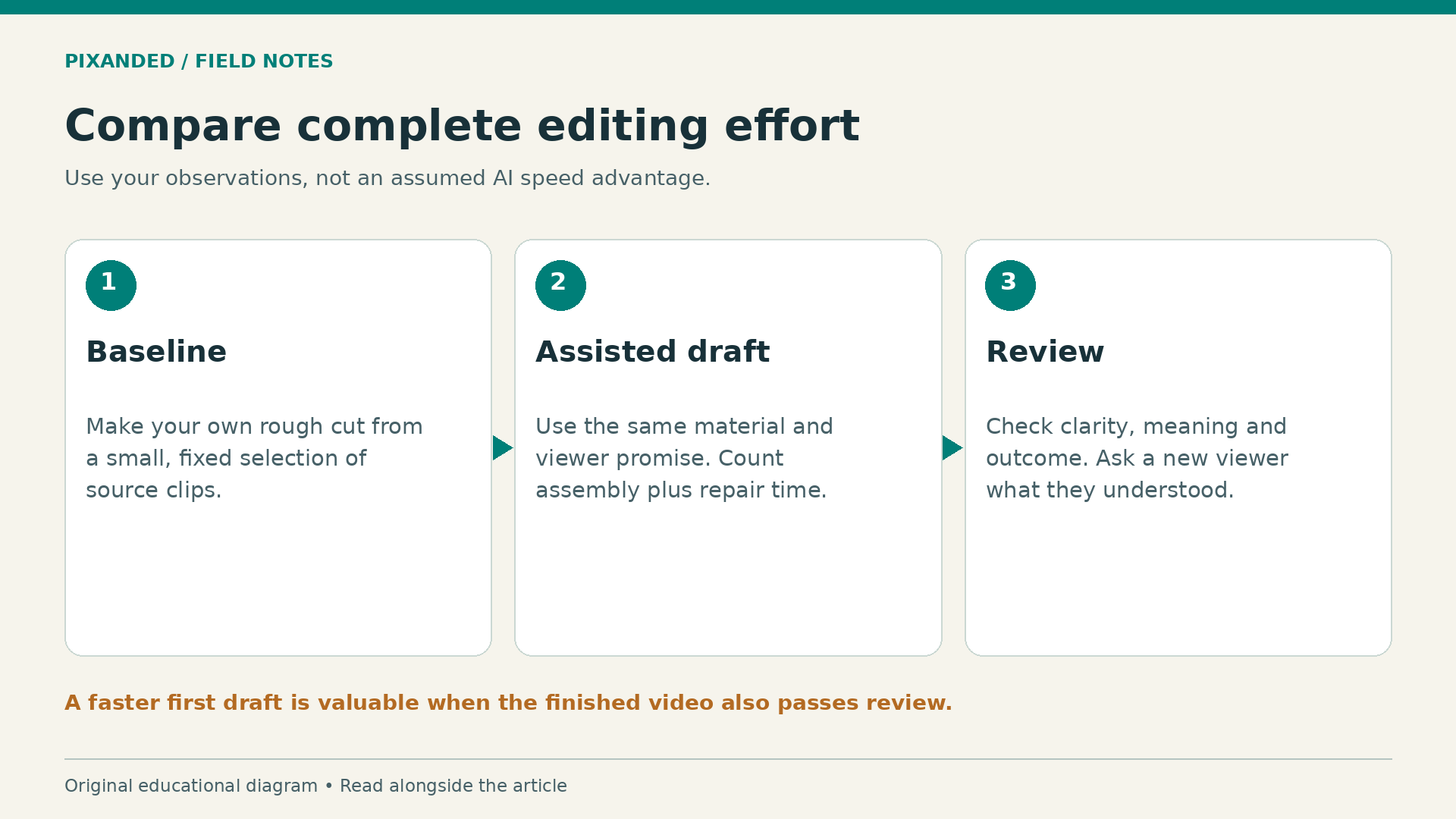
Make your own rough cut first. Give yourself enough time to choose the order, remove obvious mistakes and preserve the explanation. Save that version as your baseline. Then request an assisted draft from the same source selection if the feature is available.
Compare both versions using the same four questions: Is the promise clear? Can a beginner follow the action? Is anything misleading? Does the final shot confirm the outcome? Ask someone unfamiliar with the task to describe what they learned without prompting them.
Record editing time, repair time and the problems you found. These are your observations, not universal benchmarks. If the assistant saves ten minutes of assembly but needs fifteen minutes of repairs, it did not save time on that exercise. It may still help with a different kind of footage.
Keep the stronger parts of either version. The purpose is to understand where assistance helps your workflow, not to prove that one method must win every time. Repeat the exercise after you improve your shot planning; better source material may change the result.
Use feedback and analytics carefully
Draft feedback can help you notice a weak opening or a confusing transition, but compare every suggestion with the goal of the video. A quiet explanation may benefit from space. A factual tutorial may need a detail that would be expendable in a montage.
After publication, YouTube’s audience retention report can help you examine where viewers remain, leave or rewatch. Treat a dip as a place to investigate. It does not prove that a particular transition caused the problem. Topic, audience, traffic source and the promise made by the title can also affect viewing behavior.
Compare similar work and avoid drawing strong conclusions from a small audience. If the platform’s native video-cut testing becomes available to your channel, read its current instructions and eligibility before running an experiment. Without it, comparing two separate uploads is an informal comparison with many uncontrolled differences.
Thumbnail ideas need the same honesty check as the edit. Does the image represent what the viewer will actually receive? A dramatic thumbnail that attracts the wrong audience can make the subsequent viewing experience disappointing. Make the promise accurate before optimizing its presentation.
Keep a final human review
Before uploading, watch the exported file from beginning to end. Check speech, caption spelling, names, demonstrated steps, music rights and any private information visible in the background. Test it on a phone, especially if important details sit near the edges.
Confirm that the opening and thumbnail promise the same experience. Check that edits have not removed an important qualification from a speaker’s statement. If you use generated or substantially altered material, check the platform’s current disclosure controls for your particular content before sharing it.
For camera fundamentals, see the best camera settings for YouTube videos. Clear footage and deliberate audio give any editing method a better starting point.
Frequently asked questions
Are the new tools available to every creator?
Do not assume universal access from an announcement. Check the tools visible in your own account, app and region. The detailed September announcement calls video-cut testing coming soon.
Can AI editing make a video successful?
It can help assemble or revise a draft. Success still depends on a useful idea, a clear promise, suitable footage and the viewer’s experience. No tool can guarantee reach or income.
Should beginners still learn manual editing?
Yes. Knowing how to trim, reorder, balance audio and fix captions lets you correct mistakes and make precise creative choices when an assisted draft falls short.
What should I test first?
Use a five-shot demonstration with one visible result. Compare an assisted draft with your own baseline, counting repair time and checking whether a new viewer can follow the task.
Your next step
Write one clear viewer promise, select a small set of usable clips and build a rough cut. Use assistance where it saves useful work, then make the final decisions yourself. A coherent first video is a better milestone than an elaborate edit with no clear point.