Introduction
Understanding aperture vs shutter speed is one of the most important steps in becoming a confident photographer. These two camera settings control how light enters your camera, but they also dramatically change how your photos look, from background blur to motion freeze.

Many beginners struggle because they adjust one setting without understanding how it affects the other. The result? Overexposed images, blurry subjects, or flat-looking photos.
In this guide, you’ll learn clearly and practically how aperture and shutter speed work, how they interact, and how to use them intentionally for creative control.
Table of Contents
What Is Aperture?
Aperture refers to the opening inside your lens that allows light to pass through to the camera sensor. It is measured in f-stops such as f/1.8, f/2.8, f/4, f/8, and f/16.
How Aperture Affects Your Photos
- Brightness (Exposure)
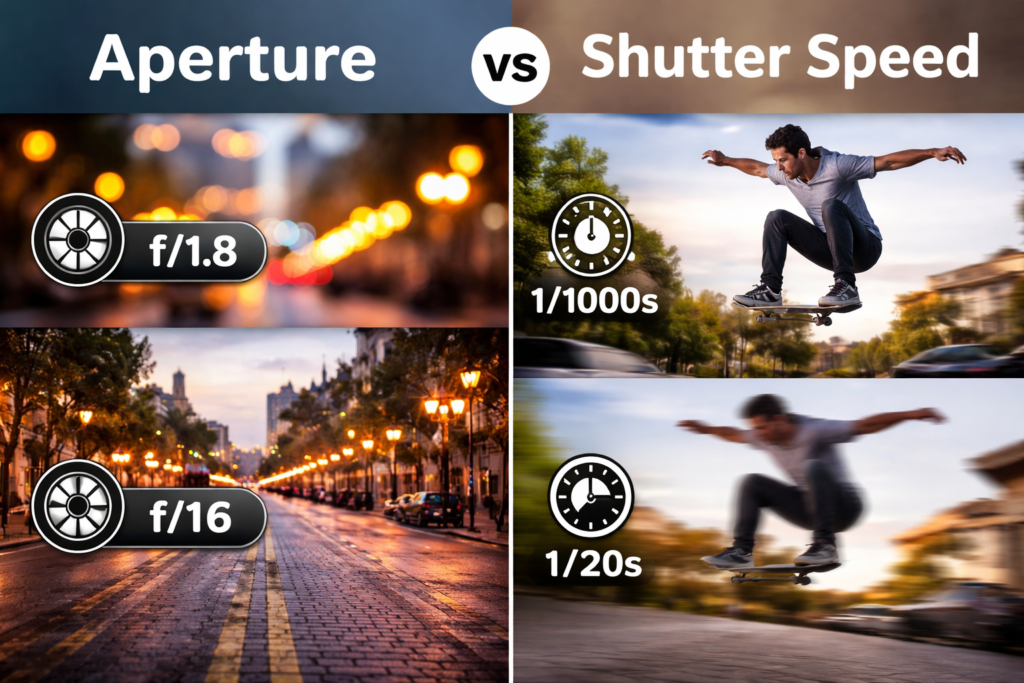
A wider aperture (f/1.8) lets in more light. A narrower aperture (f/16) lets in less light. - Depth of Field
- Wide aperture → blurry background (shallow depth of field)
- Narrow aperture → sharp foreground and background (deep depth of field)
This is why portrait photographers often use f/1.8 or f/2.8, while landscape photographers prefer f/8 or f/11.
What Is Shutter Speed?
Shutter speed controls how long the camera sensor is exposed to light. It is measured in seconds or fractions of a second, such as 1/1000, 1/250, 1/60, 1/10, or 2 seconds.
How Shutter Speed Affects Your Photos
- Brightness (Exposure)
A slower shutter speed lets in more light. A faster shutter speed lets in less light. - Motion Blur
- Fast shutter speed → freezes motion
- Slow shutter speed → creates motion blur
The picture below was taken from Hunter &Sarah‘s website

For example:
- 1/1000 sec freezes sports action
- 1/30 sec may cause blur if handheld
- 5 seconds creates light trails
Aperture vs Shutter Speed: Core Differences
While both control exposure, they influence your image in very different creative ways.
| Setting | Controls Light | Affects Background Blur | Affects Motion |
| Aperture | Yes | Yes | No |
| Shutter Speed | Yes | No | Yes |

This is the key difference when comparing aperture vs shutter speed:
- Aperture changes the depth of field.
- Shutter speed changes motion rendering.
Both influence brightness, but their creative effects are different.
How They Work Together (Step-by-Step)
To properly understand aperture vs shutter speed, you must see how they balance each other.
Step 1: Choose Your Creative Priority
Ask yourself:
- Do I want background blur? → Adjust aperture.
- Do I want to freeze motion? → Adjust shutter speed.
Step 2: Adjust Exposure
If you widen your aperture (f/2 → f/1.8), more light enters. You may need a faster shutter speed to prevent overexposure.
If you slow your shutter speed (1/250 → 1/60), more light enters. You may need to narrow your aperture.
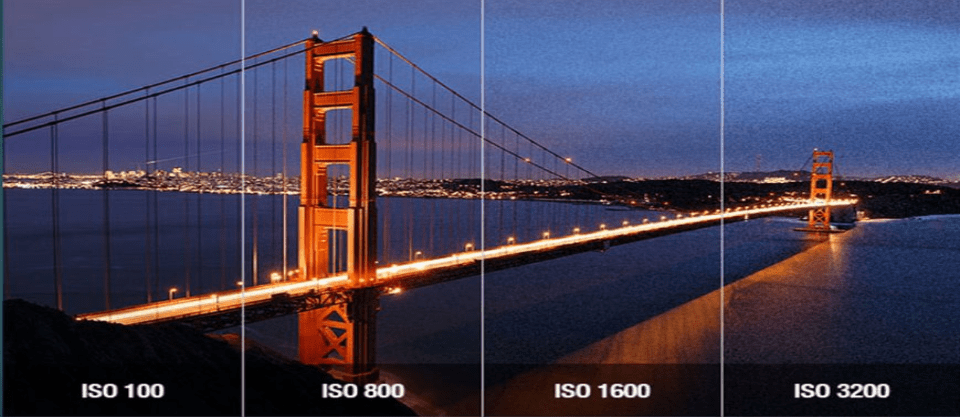
Step 3: Use ISO as the Final Adjustment
After balancing aperture and shutter speed, adjust ISO if needed.
This three-part relationship is called the exposure triangle.

Practical Examples You Can Try
Example 1: Portrait Photography
- Aperture: f/1.8
- Shutter Speed: 1/200
- Result: Sharp subject, blurred background
Example 2: Sports Photography
- Aperture: f/4
- Shutter Speed: 1/1000
- Result: Frozen motion
Example 3: Night Photography
- Aperture: f/8
- Shutter Speed: 10 seconds
- Result: Light trails
Example 4: Landscape Photography
- Aperture: f/11
- Shutter Speed: 1/125
- Result: Everything sharp
Common Beginner Mistakes
1. Only Thinking About Brightness
Aperture and shutter speed are not just brightness tools — they are creative tools.
2. Using Too Slow Shutter Speed Handheld
Anything slower than 1/60 may cause blur without stabilization.
3. Shooting Wide Open All the Time
f/1.8 is not always best. Sometimes f/4 gives better sharpness.
4. Ignoring Motion in the Scene
If your subject moves, shutter speed becomes more important than aperture.
Tips to Master Exposure Control
- Practice in Aperture Priority mode.
- Practice in Shutter Priority mode.
- Compare results side by side.
- Review EXIF data after shooting.
- Shoot in manual mode once comfortable.
The more you experiment with aperture vs shutter speed, the more intuitive your decisions will become.
What is the main difference between aperture and shutter speed?
Aperture controls depth of field, while shutter speed controls motion blur.
Which is more important, aperture or shutter speed?
Neither is more important. It depends on whether you want background blur or motion control.
Does aperture affect sharpness?
Yes. Extremely wide or narrow apertures can reduce sharpness, depending on your lens.
What shutter speed prevents blur?
Generally, 1/125 or faster for moving subjects, 1/60 for still subjects when handheld.
Can I use both creatively together?
Yes. Professional photographers constantly balance aperture and shutter speed for creative results.
Conclusion
Mastering aperture vs shutter speed is essential for creative control in photography. Once you understand how each setting affects exposure, motion, and depth of field, your images will become more intentional and professional.
Instead of guessing, you’ll start making decisions with purpose, and that’s when real growth begins.
Practice regularly, experiment with different lighting situations, and review your results. Photography is learned through doing.
At Pixanded, you can also learn: What is ISO in Photography? Beginner-Friendly Guide